# Object Actions (Dynamic Action)
Screenshots on this page are taken from the Chinese UI. Menu, field and button names in the text use the English UI labels.
Object actions add custom operation buttons to list pages, such as "Lock User", "Active" (activate a theme) or "批量加入用户组" (add users to groups in batch; this label has no English translation and is shown in Chinese in the English UI). When the button is clicked, the platform executes the action's core logic and shows the execution result to the user.
# Target Audience
This document is intended for developers and implementers of the system.
# Related Menus
| Menu | Purpose |
|---|---|
Development > Actions > Actions | Maintain the actions themselves (DynamicAction) |
Development > Actions > DynamicActionDynamicForm | Attach actions to forms, which determines the lists an action appears in |
Development > Actions > Action Groups | Maintain action groups (DynamicActionGroup). Groups have no effect in the current version; see Attach to Forms |
Exec History > Action | View the record of each execution (DynamicActionExecRecord) |
# Action Definition
Click "Create" under Development > Actions > Actions, or import action definitions through DynamicAction.csv seed data.
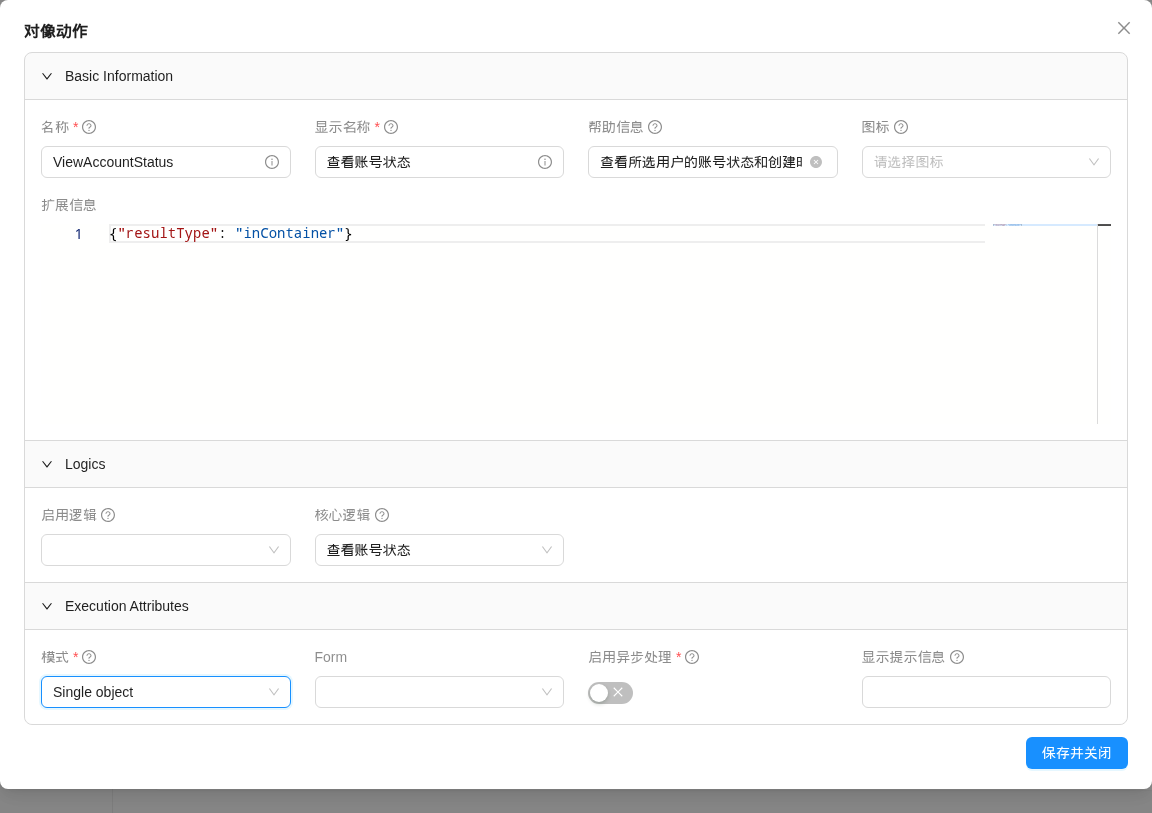
| Field | Description |
|---|---|
| Name (name) | Required, unique; cannot be changed after creation |
| Label (label) | Required; the text shown on the button |
| Help text (helpText) | Description of the action; when the action has a parameter form, it is shown above the form |
| Icon (icon) | Button icon; see Icons |
| Ext info (extInfo) | JSON that controls display and execution behavior; see Available extInfo List |
| Enable logic (enableLogic) | A dynamic logic of type DYNAMIC_ACTION_ENABLE_LOGIC that determines which records the action is available for; see Enable Logic |
| Core logic (coreLogic) | A dynamic logic of type DYNAMIC_ACTION_LOGIC; the code the action actually executes, see Core Logic. It can be empty; when it is empty, the parameter form has no submit button |
| Mode (mode) | OBJECT_SINGLE / OBJECT_MULTIPLE / CLASS_LEVEL; see Mode and Display Position |
| Form (form) | Parameter form, a form of type ACTION; see Parameter Form |
| Enable asynchronous (enableAsync) | When true, the action runs in the background, the frontend returns immediately, and a result message is pushed when execution finishes |
| Confirm message (confirmMessage) | When not empty, a confirmation dialog showing this text pops up before execution |
| Active (active) | Shown only in the edit form. When false, the button is still shown, but execution returns Action not found |
| Access requirement (accessRequirement) | The role requirement (RoleRequirement) that must be met to execute the action, with values such as USER, DEVELOPER, ADMIN |
The access requirement must be set
An action whose accessRequirement is empty does not appear in any list, and calling the execution API directly also returns No permission to execute action. In the current version, neither the create form nor the edit form has this field. After creating an action in the UI, you need to fill it in through CSV import or the data API (PUT /data/DynamicAction/{id} with the request body {"accessRequirement": {"id": <RoleRequirement id>}}).
The create and edit forms are organized into the groups Basic Information, Logics and Execution Attributes, and the mode dropdown offers the options Single object, Multiple objects and Class level action.
The header of the CSV seed data is as follows:
name(*),mode,form.name,confirmMessage,coreLogic.name,enableLogic.name,label,icon,helpText,enableAsync,isSystem,extInfo,active,accessRequirement.name
# Mode and Display Position
| Mode | Dropdown label | Meaning | Position in the list |
|---|---|---|---|
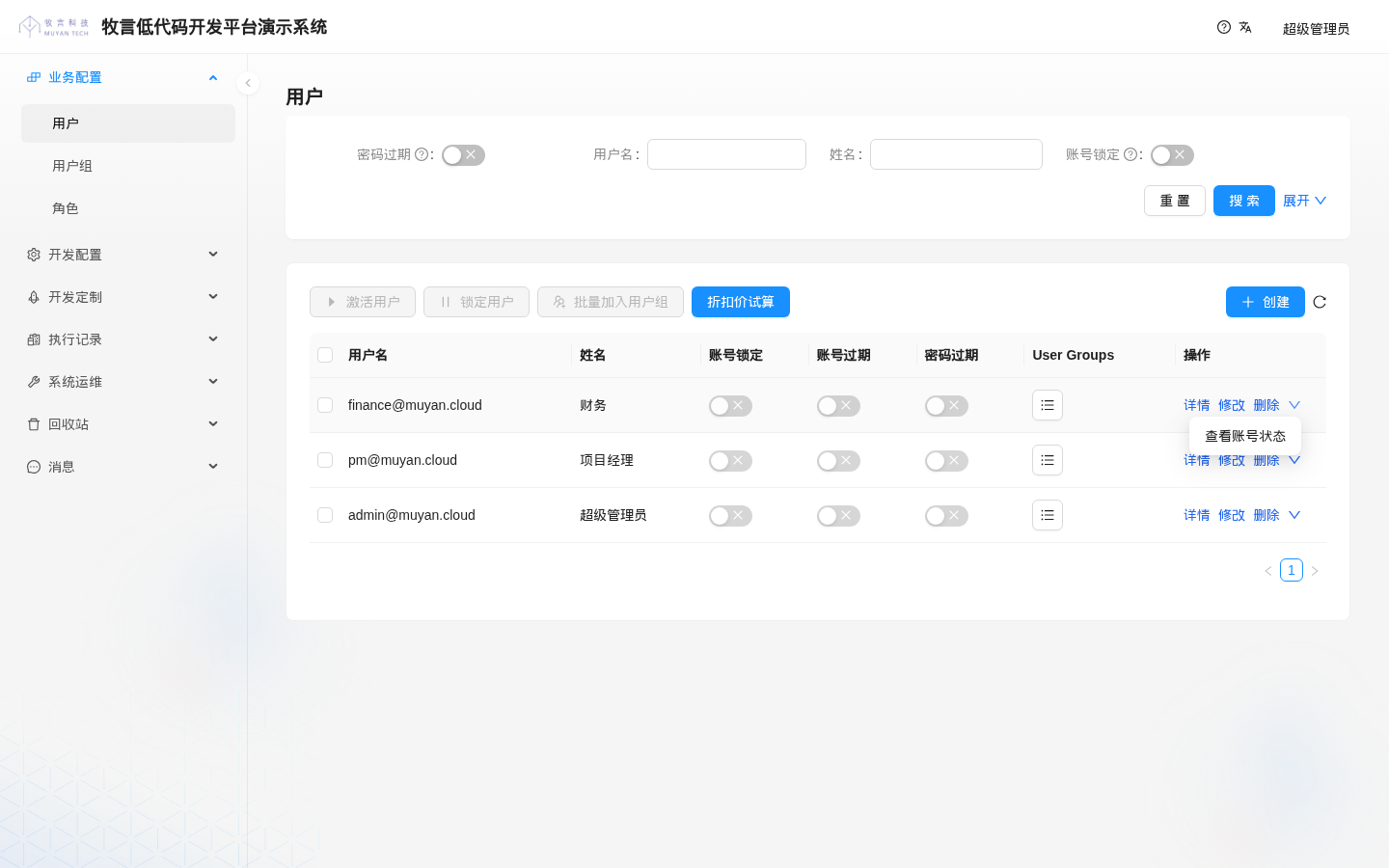
OBJECT_SINGLE | Single object | Acts on one record | The dropdown menu at the end of the "Operation" column of each row |
OBJECT_MULTIPLE | Multiple objects | Acts on one or more selected records | The toolbar above the table; available after records are selected |
CLASS_LEVEL | Class level action | Does not target specific records; acts on the whole object type | The toolbar above the table; always available |
In the screenshot below, "折扣价试算" is a CLASS_LEVEL action shown in the toolbar, and "查看账号状态" is an OBJECT_SINGLE action shown in the dropdown menu at the end of the row:
# Parameter Form
When an action needs parameters from the user, set a form of type ACTION in the Form field. After the action is clicked, the platform shows the form in a drawer (default) or a modal; the user fills it in and clicks submit to execute:
- The values entered by the user are available in the core logic as the
parametersvariable. The platform first converts the values according to the types of the form fields; the raw values before conversion are available asrawParameters. - Whether to use a drawer or a modal, the submit button text, how results are displayed, and so on can be set in
extInfo.actionof the parameter form, or in the action's ownextInfo; see Available extInfo List for the keys. The two are not merged: as soon as the parameter form'sextInfocontains anactionkey, the action's ownextInfono longer takes effect at all. - In parameter form mode, the result is shown in the drawer/modal by default after execution, and the submit button becomes a rerun button.
An action without a parameter form executes immediately when clicked; if confirmMessage is not empty, a confirmation dialog pops up first.
# Attach to Forms
An action is not directly associated with a domain model. Instead, it is attached to a form through DynamicActionDynamicForm: the action appears on the list page of whichever list form it is attached to. Maintain these records under Development > Actions > DynamicActionDynamicForm; the fields are as follows:
| Field | Description |
|---|---|
action | Required; the action |
form | Required; the form, usually the list form of an object |
displaySequence | Required; the display order, smaller values come first |
group | Action group (DynamicActionGroup) |
The same action can be attached to the same form only once. The header of the CSV seed data is as follows:
action.name(*),form.name(*),displaySequence,group.name
WARNING
In the current version, the API that returns the action list does not return group information, and the frontend does not merge actions by group, so setting group currently has no effect.
# Enable Logic
When returning the action list, the platform runs the action's enable logic on the currently selected records (or the current row) to decide which records the action is available for. The enable logic is a dynamic logic of type DYNAMIC_ACTION_ENABLE_LOGIC.
Before executing the action, the platform runs the enable logic once more. If any of the selected records is unavailable, the execution fails, and the result in the execution record is Action xxx is disabled for ....
# Injected Variables
| Variable name | Variable type | Description |
|---|---|---|
userContext | tech.muyan.api.security.MuyanAuthentication | Information about the current user |
action | tech.muyan.dynamic.action.DynamicAction | The current action definition |
form | tech.muyan.dynamic.form.DynamicForm | The form the action is on |
objects | List | The list of records to evaluate |
domainClass | tech.muyan.DomainClass | Object type information of the records |
log | Closure | Prints execution logs |
application | grails.core.GrailsApplication | The current Grails application context |
# Return Value
The enable logic returns the list of ids of the available records:
// Only locked users can run "activate user"
return [
  enableIds: objects.findAll { it.accountLocked }.collect { it.id }
]
2
3
4
- If the returned Map has no
enableIds(or its value isnull), all records are considered available. - If the enable logic throws an exception, all records are considered unavailable.
- If no enable logic is configured, all records are available.
Enable logic has no effect on CLASS_LEVEL actions
The platform does not run the enable logic when no record is selected in the list, and a CLASS_LEVEL action has no records to evaluate when it executes, so enable logic cannot disable a CLASS_LEVEL action. To restrict who can execute it, use accessRequirement.
# Core Logic
The core logic is a dynamic logic of type DYNAMIC_ACTION_LOGIC, i.e. the code the action actually executes.
# Injected Variables
| Variable name | Variable type | Description |
|---|---|---|
userContext | tech.muyan.api.security.MuyanAuthentication | Information about the current user |
action | tech.muyan.dynamic.action.DynamicAction | The current action definition |
form | tech.muyan.dynamic.form.DynamicForm | The form that triggered the action |
objects | List | The list of selected records. In OBJECT_SINGLE mode it is also a list, with only one element; in CLASS_LEVEL mode it is an empty list |
objectIds | List<Long> | The list of ids of the selected records |
domainClass / objectType | tech.muyan.DomainClass | Object type information of the records; both variables hold the same value |
parameters | Map<String, Object> | The values entered by the user in the parameter form, converted according to field types |
rawParameters | Map<String, Object> | The raw values entered by the user in the parameter form |
searchConditions | Map | The current search conditions of the list page at execution time; see Batch Processing by Search Conditions |
log | Closure | Prints execution logs; the content is saved to the "Execute log" of the execution record |
application | grails.core.GrailsApplication | The current Grails application context |
Example: view the account status of the selected user (an OBJECT_SINGLE action)
def user = objects[0]
String status = user.accountLocked ? "已锁定" : "正常"
log("查看账号状态:${user.username}")
return [execResult: "用户:${user.name}(${user.username})\n账号状态:${status}\n创建时间:${user.dateCreated.toLocalDate()}"]
2
3
4
# Batch Processing by Search Conditions
When an action is executed on a list page, the frontend submits the current conditions of the search panel as searchConditions. When you need to batch-process "all records matching the current search conditions" (rather than only the records selected on the current page), query them yourself in the core logic based on searchConditions.
# Execution Result
# Return Value Convention
When the core logic executes normally, it returns a Map with the following structure:
[
  // Execution result text, saved to the execution record and shown to the user
  execResult: "Execution result",
  // Type is tech.muyan.storage.StorageFieldValue; the frontend downloads this file automatically after execution completes
  download: storageFieldValue,
  // The following fields are only saved to the execution record and are not used by the current frontend
  displayType: "markdown",
  execResultInfo: "Extra info",
  redirect: "/some/page"
]2
3
4
5
6
7
8
9
execResult: the text of the execution result; it is saved to the execution record and shown to the user.download: when its value is atech.muyan.storage.StorageFieldValue, the frontend automatically downloads the file after execution. Values of other types are ignored.displayType,execResultInfo: saved to the execution record, but the execution API in the current version does not return these two fields, so the frontend does not use them when displaying the result.redirect: saved to the execution record, but the current frontend does not handle the redirect.
# Exceptions and Execution Status
| Situation | Execution status |
|---|---|
| Normal return | SUCCESS |
Throws tech.muyan.exception.CustomLogicWarningException (or a subclass) | SUCCESS_WITH_WARNING; the exception message is appended to the execution log |
| Throws any other exception | FAILED; the exception message becomes the execution result and the stack trace is saved to "Stacktrace" |
| The enable logic determines that a selected record is unavailable | FAILED |
If you want to return a result while throwing a warning exception, use the constructor CustomLogicWarningException(String message, Object data), where data is a Map from which the platform reads execResult and download:
throw new tech.muyan.exception.CustomLogicWarningException(
  "部分记录已跳过",
  [execResult: "成功处理 8 条,跳过 2 条"]
)
2
3
4
Execution records also have two intermediate statuses: NOT_START (submitted but not started) and RUNNING (executing).
# Result Display
- For an action without a parameter form, the result is shown as a message notification (toast) by default; after setting
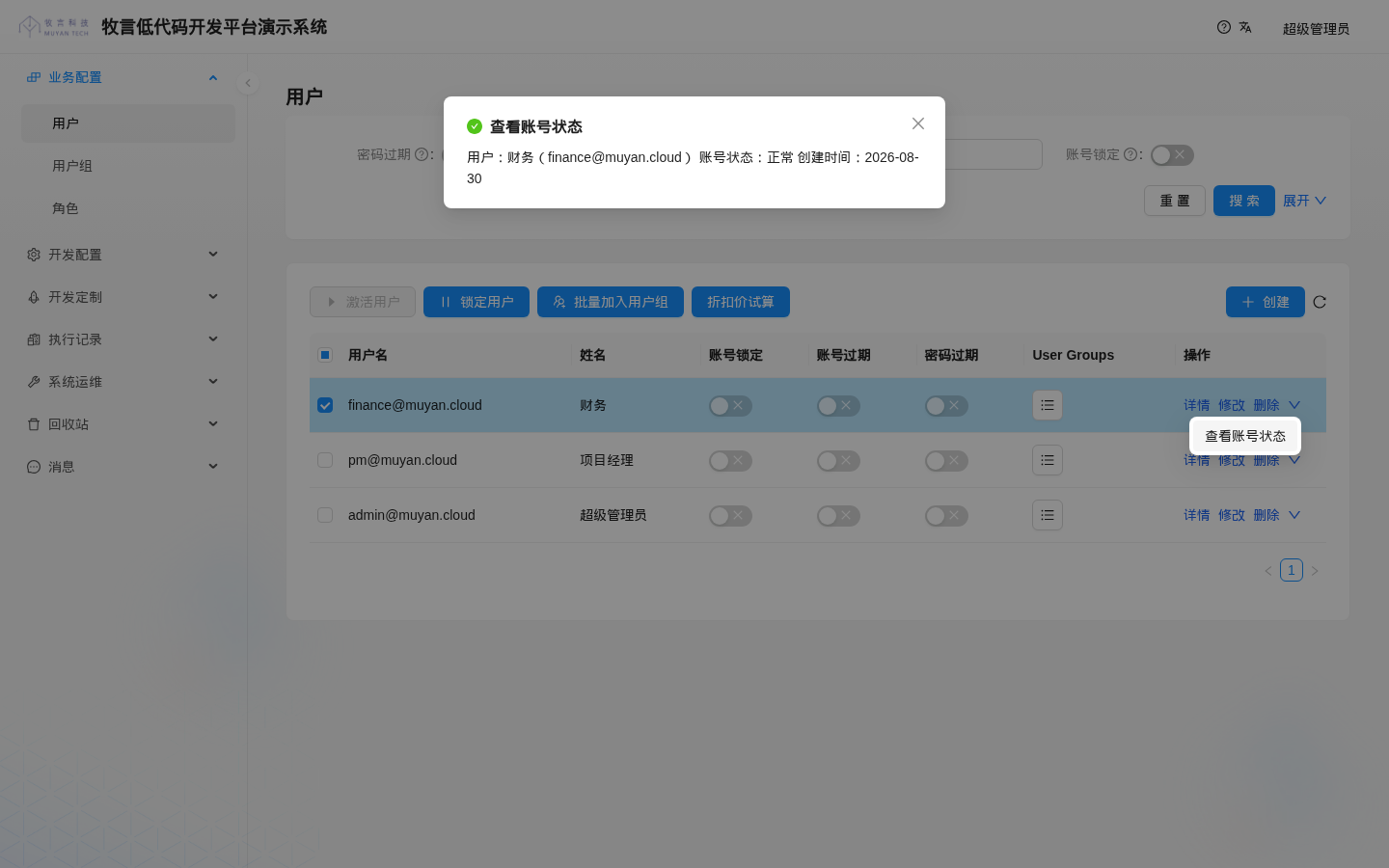
"resultType": "inContainer"in the action'sextInfo, the result is shown in a modal. Line breaks in the execution result are not preserved in the modal. - For an action with a parameter form, the result is shown by default in the drawer/modal containing the parameter form; after setting
"resultType": "toast", it is shown as a message notification instead and the drawer/modal is closed.
The screenshot below shows the result of executing the "查看账号状态" action (with resultType set to inContainer) using the example code above. The line breaks have no effect, so the three lines are displayed as one paragraph (wrapped automatically at the modal width when too long):
# Execution Records
Each execution saves a record in DynamicActionExecRecord, which can be viewed under Exec History > Action, including the submitter, objects, status, execution result, execution log, stack trace, download file and so on.
WARNING
Execution records currently cannot be deleted through the UI or the data API, and once an action is referenced by execution records, the action cannot be deleted either. To take an action offline, delete its attachment records in DynamicActionDynamicForm and turn off "Active".
# Available extInfo List
The following are the extInfo keys available for actions. Put them in the action's "Ext info", or under the action key of the parameter form's extInfo:
{
  /** How the parameter form is shown: drawer (default) or modal */
  "layout"?: "drawer" | "modal",
  /** Text of the submit button of the parameter form, defaults to "Submit" */
  "submitButtonText"?: string,
  /** How the result is shown: toast for a message notification, inContainer to show it inside the modal/drawer.
      Defaults to toast when there is no parameter form, and to inContainer when there is one */
  "resultType"?: "toast" | "inContainer",
  /** Modal style; only width is currently used (effective when layout is modal) */
  "style"?: { "width"?: number | string }
}2
3
4
5
6
7
8
9
10
# Related APIs
The paths in the table below omit the /api prefix; add it when calling from outside, see Address Prefix.
| API | Description |
|---|---|
GET /action/byFormId/{formId}?ids=1,2 | Gets the actions attached to the form that the current user has permission for; ids are the records to evaluate, and the returned enableIds are those among them that are available |
POST /action/byId/{actionId} | Executes an action by id |
POST /action/byName/{actionName} | Executes an action by name |
Request body of the execution API:
{
  "ids": [1, 2],
  "formId": 38,
  "formValues": { "remark": "..." },
  "searchConditions": { }
}
2
3
4
5
6
formId is the id of the form that triggered the action, from which the platform determines the object type; formValues are the values of the parameter form. For synchronous execution, the API returns the status of this execution (status), execResult, execLog, download, stackTrace, etc.; for asynchronous execution, it returns immediately and the result is pushed to the user when it completes.