# Dynamic Service
Screenshots on this page are taken from the Chinese UI. Menu, field and button names in the text use the English UI labels.
A dynamic service publishes a piece of dynamic logic as an HTTP endpoint that frontend pages, mobile apps or third-party systems can call. The service logic is defined and modified at runtime, without recompiling or redeploying.
Upgrade note (1.0.0-beta18)
Since beta18 (#768), dynamic services whose Enable Anonymous (enableAnonymous) is off or not set reject requests that are not logged in, returning errorCode: 11004 (AnonymousInvocation).
Before that, this switch had not worked for about a year (after the platform started representing non-logged-in users with an anonymous identity object in 2025-09, the check auth == null was never true), so any dynamic service could be called without logging in. Therefore, after upgrading to beta18, services that have been called anonymously will suddenly fail.
Check each service before upgrading:
- For services that genuinely need anonymous access (for example endpoints called by public pages), turn on
Enable Anonymous; - For the other services, make the callers pass a token, see Invocation and Authentication.
For services with Enable Log turned on, the following SQL finds the services that have been called anonymously and will be rejected after the upgrade (services without Enable Log leave no execution records, so check their callers instead):
select s.name, s.enable_anonymous, count(*) as anonymous_calls, max(r.start_time) as last_call
from dynamic_service_exec_record r
join dynamic_service s on s.id = r.provider_id
where coalesce(s.enable_anonymous, false) = false
  and (r.exec_auth is null or r.exec_auth::text like '%Anonymous%')
group by 1, 2 order by 3 desc;
2
3
4
5
6
Note: the HTTP status code for a rejection is currently 500 (not 403). Clients should check the errorCode in the response body, see Error Codes.
# Target Audience
The target audience of this document is: developers and implementers of this system
# Defining a Dynamic Service
Menu: Development > Integration > Services
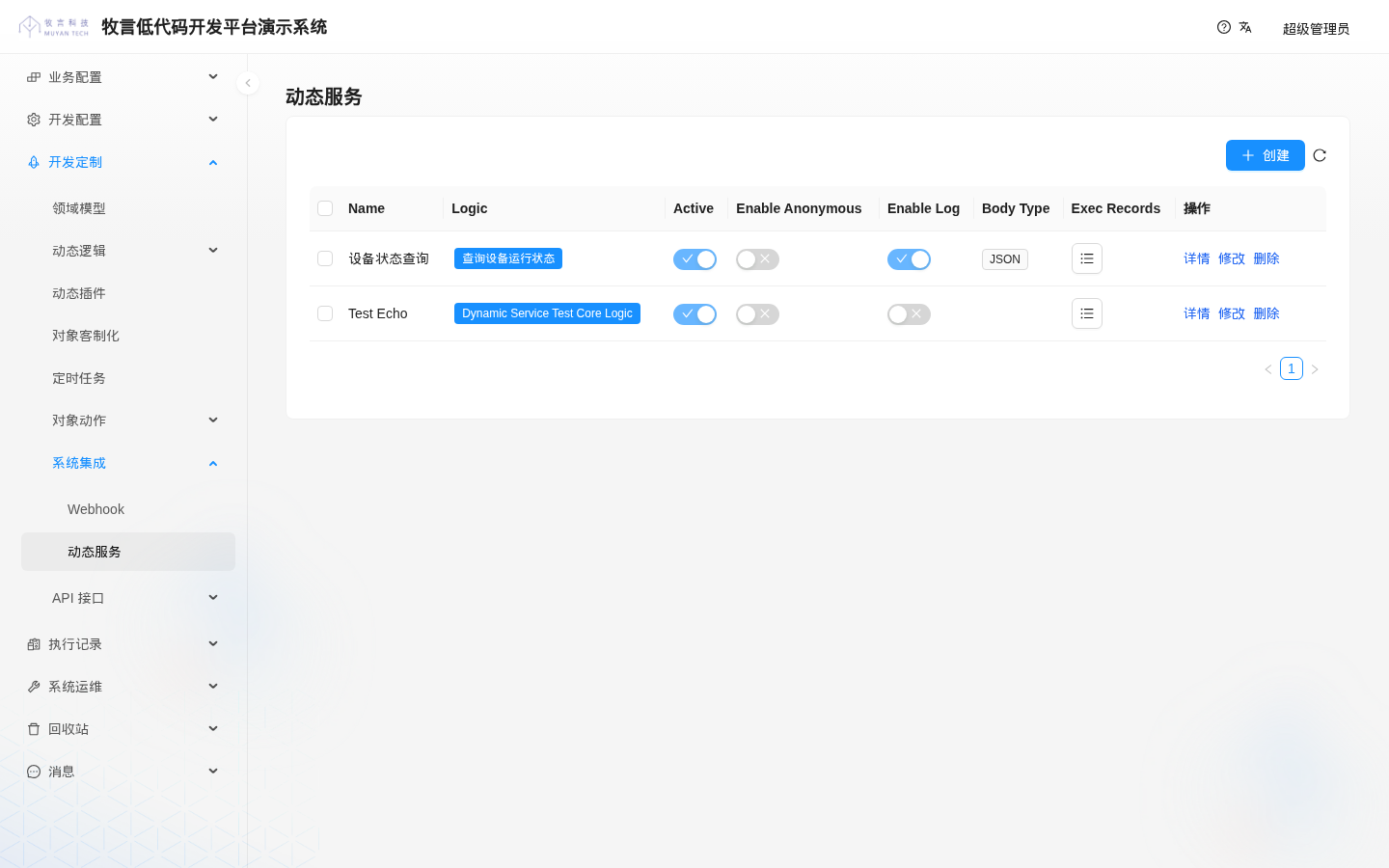
In the screenshot, "设备状态查询" is the service used in the examples on this page (Active and Enable Log on, Enable Anonymous off); "Test Echo" is a sample service shipped with the platform project template (from the template's data/csv/DynamicService_example.csv) and exists in every newly created system.
| UI label | Property | Type | Description |
|---|---|---|---|
| Name | name | String | Service name, unique within the tenant, cannot be changed after creation; used in the invocation address |
| Logic | logic | tech.muyan.dynamic.DynamicLogic | The logic the service runs; the logic type is DYNAMIC_SERVICE_CORE_LOGIC |
| Active | active | Boolean | Whether the service is active |
| Enable Anonymous | enableAnonymous | Boolean | Whether calls without login are allowed; off by default |
| Enable Log | enableLog | Boolean | Whether to record execution records; off by default. Execution records are produced only when it is on |
| Body Type | bodyType | Enum | How the request body is parsed: JSON, XML, INPUT_STREAM; treated as JSON when empty |
| Exec Records | execRecords | Execution records of the service |
To create a dynamic service:
- In
Development > Logics > Logics, create a dynamic logic of typeDYNAMIC_SERVICE_CORE_LOGIC(dynamic service core logic). - On the dynamic service list page, click
Create, fill in the name, select the logic from the previous step, turn onActive, set the other switches as needed, and save.
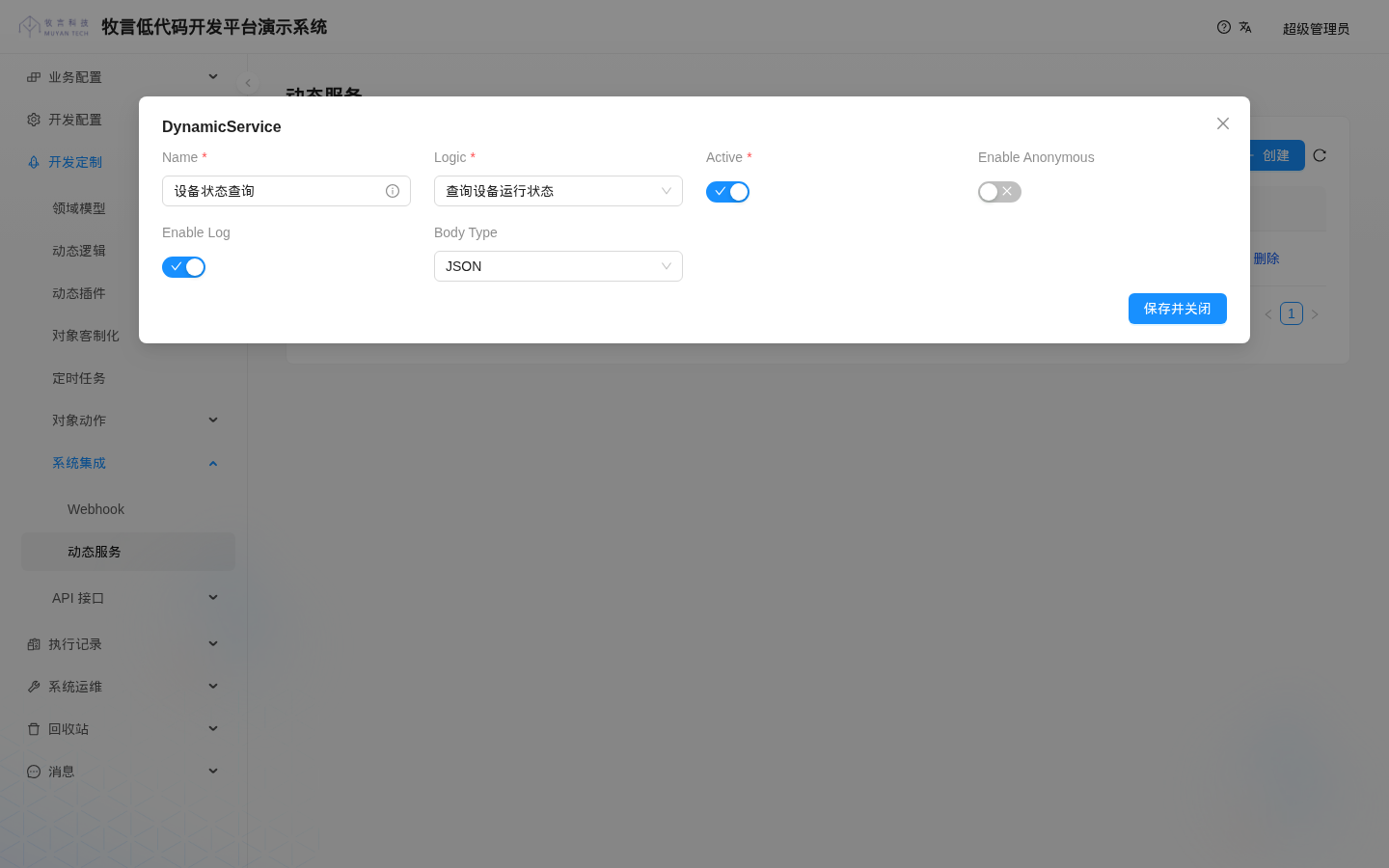
The service name and logic in the screenshot match the examples below. The dialog title shows the domain class name DynamicService; this is a UI issue in the current version.
# Injected Variables
When the service logic runs, the following injected variables are available:
| Variable | Type | Description |
|---|---|---|
user | tech.muyan.api.security.MuyanAuthentication | The caller. For calls without login it is an anonymous identity object, not null |
method | String | HTTP method of the request, for example GET, POST |
params | Map<String, Object> | URL parameters. A parameter with a single value is a string; a parameter with multiple values is a list |
body | Object | Request body, parsed according to Body Type: a JSON object for JSON, an XML object for XML, the raw input stream for INPUT_STREAM |
log | Closure<?> | log closure for printing execution logs; with Enable Log on, logs are written to the execution record |
TIP
The access_token parameter in the URL also appears in params.
# Return Value
The logic should return a Map with the two keys status and body:
status: the HTTP status code returned to the caller. It must be an integer; 200 when omitted;body: the content returned to the caller, converted to JSON. When omitted, or when it is an empty list, an empty string,0orfalse,{}is returned.
WARNING
The platform only takes status and body from the return value; other keys are discarded. If status is not a number, the call fails (HTTP 500, For input string: ...). Do not put business status fields at the top level of the return value; put them in body.
Example: return an equipment's running status by equipment code.
log("收到请求:method=${method}, params=${params}")
String code = params.equipmentCode ?: body?.equipmentCode
if (!code) {
  return [status: 400, body: [message: '缺少参数 equipmentCode']]
}
return [
  status: 200,
  body  : [
    equipmentCode: code,
    runningStatus: '运行中',
    caller       : user.name,
    method       : method,
  ]
]
2
3
4
5
6
7
8
9
10
11
12
13
14
# Invocation and Authentication
The invocation address is:
http://<server address>/api/service/<service name>
- If the service name contains Chinese characters, spaces and similar characters, it must be URL-encoded.
- HTTP methods are not restricted:
GET,POST,PUTandDELETEall run the same logic, which can tell them apart withmethod. - Authentication is the same as for the platform's other REST APIs: first log in to get an
access_token, then pass it with the request headerAuthorization: Bearer <access_token>, the URL parameteraccess_tokenor a cookie. See Passing the Token in Requests. The old user token and theX-MY-Tokenrequest header were removed in 1.0. - With
Enable Anonymouson, the service can be called without a token, in which caseuseris the anonymous identity.
Taking the sample service "设备状态查询" as an example (Enable Anonymous off, as in the list screenshot above):
# Call with a token (the request header is recommended)
curl 'http://<server address>/api/service/%E8%AE%BE%E5%A4%87%E7%8A%B6%E6%80%81%E6%9F%A5%E8%AF%A2?equipmentCode=EQ-001' \
  -H 'Authorization: Bearer <access_token>'
# Returns HTTP 200
# {"caller":"超级管理员","method":"GET","equipmentCode":"EQ-001","runningStatus":"运行中"}

# POST a JSON request body
curl -X POST 'http://<server address>/api/service/%E8%AE%BE%E5%A4%87%E7%8A%B6%E6%80%81%E6%9F%A5%E8%AF%A2' \
  -H 'Authorization: Bearer <access_token>' -H 'Content-Type: application/json' \
  -d '{"equipmentCode":"EQ-002"}'

# No token, and the service does not have Enable Anonymous on
curl 'http://<server address>/api/service/%E8%AE%BE%E5%A4%87%E7%8A%B6%E6%80%81%E6%9F%A5%E8%AF%A2?equipmentCode=EQ-001'
# Returns HTTP 500
# {"msg":"ErrorCode: 11004, ErrorMsg: AnonymousInvocation","errorCode":11004}
2
3
4
5
6
7
8
9
10
11
12
13
14
15
Inside the platform (other dynamic logic, plugins), dynamic services are no longer called from one another; the old DynamicServiceConsumerService, service discovery and the jvm:// invocation style were removed in 1.0 (plugins can use Dynamic RPC instead).
# Error Codes
When the platform intercepts a request, the response body has the format {"msg": "...", "errorCode": <error code>}:
| errorCode | Name | Scenario |
|---|---|---|
| 11001 | ProviderNotFound | No service with that name |
| 11003 | ProviderInactivated | The service is not active (Active off) |
| 11004 | AnonymousInvocation | Call without login, and the service does not have Enable Anonymous on |
The platform checks the table from top to bottom; for example, when the service is not active, 11003 is returned whether or not the caller is logged in. When the logic throws an ordinary exception during execution, the response body is {"msg": "<exception message>"}; when it throws a platform exception (for example 1007 RateLimitExceed when the logic is rate-limited), errorCode is included as well.
HTTP status code
In the current version, the HTTP status code of all the errors above is 500, without distinguishing "not found", "unauthorized" and so on. Determine the error type from the errorCode in the response body, and do not rely on the HTTP status code.
# When Configuration Changes Take Effect
The platform caches dynamic service definitions (configuration such as Active, Enable Anonymous, Enable Log and Body Type). By design, the cache should be invalidated immediately after a service is modified; but the current version has a known defect: when a plugin import completes, the platform clears the cache's change-listener registrations, while dynamic services keep using the cache obtained before the import, so subsequent configuration changes do not invalidate it and it can only expire naturally. This cache expires only after the service has not been called for 10 consecutive minutes, so after you change this configuration, the new configuration does not take effect as long as the service keeps being called. In practice: after changing Enable Anonymous or Active and calling immediately, the old configuration was still applied; after stopping calls for 10 minutes and then calling again, the new configuration took effect.
WARNING
This means that turning off Enable Anonymous or Active does not stop calls immediately. When you need to disable a service urgently, change its logic to return an error directly (logic changes take effect immediately), for example return [status: 403, body: [message: '服务已停用']].
Changes to the logic's code are not affected by this cache and take effect on the next call after saving.
# Execution Records
For services with Enable Log on, every call that enters logic execution produces an execution record (calls rejected by the checks in Error Codes are not recorded). View them in Exec History > Service, or click the button in the Exec Records column of the dynamic service list to view a single service's records.
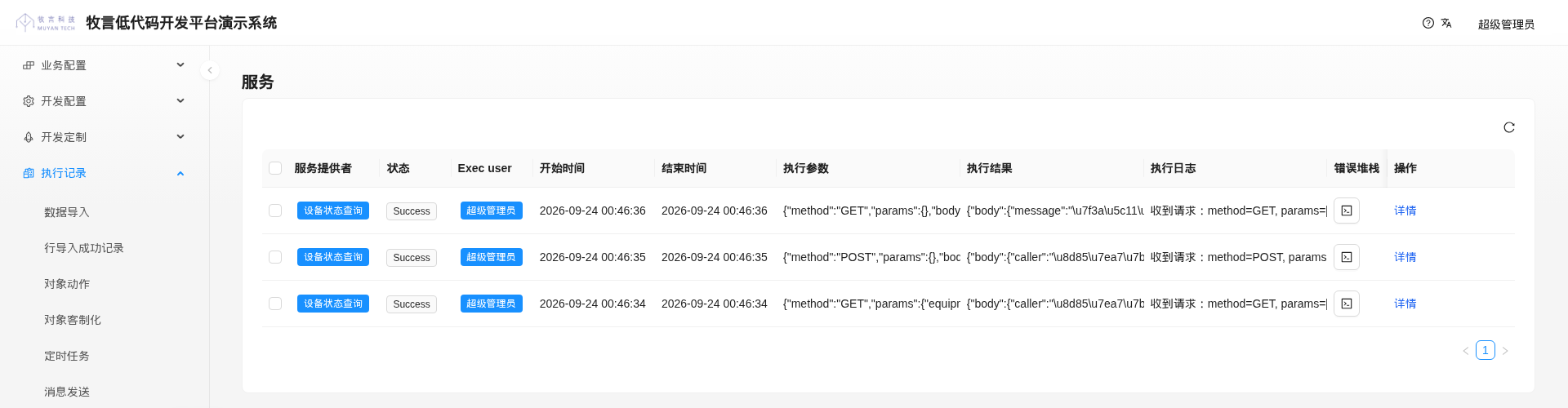
The records in the screenshot are in reverse chronological order: the bottom two come from the GET and POST calls with a token in Invocation and Authentication above; the top one is a call without equipmentCode, for which the logic returned 400, but the logic itself ran successfully, so the status is Success. The call without login was rejected with 11004 and was not recorded.
The execution records have many columns, and you need to scroll horizontally to see columns such as Exec result, Exec log and Stack Trace (the screenshot widens the window and truncates long text columns to show all columns on one screen). In the Stack Trace column, click the button to view the full content. Exec result is stored as JSON, with Chinese characters escaped as \uXXXX. In the current version, clicking Details at the end of a row leaves the dialog loading forever (the platform has no detail form configured for dynamic service execution records); this is a UI issue in the current version.
| Column | Description |
|---|---|
| Service Provider | The dynamic service that was called |
| Status | Success or Failed |
| Exec user | The caller; the anonymous identity for calls without login |
| Start time | Time execution started |
| Finish Time | Time execution finished |
| Exec params | The request method, URL parameters and request body |
| Exec result | The logic's return value |
| Exec log | Logs printed with log in the logic |
| Stack Trace | Exception information when an error occurs |
WARNING
An access_token passed as a URL parameter is recorded verbatim in "Exec params". When calling a service with Enable Log on, pass the token with the Authorization request header.