# Dynamic Logic
Screenshots on this page are taken from the Chinese UI. Menu, field and button names in the text use the English UI labels.
The system supports customization using the Groovy (opens new window) language. Groovy is a superset of Java: it supports Java syntax and adds more dynamic features, which makes it well suited to domain modeling and runtime enhancement.
TIP
If your team is not familiar with Groovy, you can also develop entirely in Java syntax. Groovy is highly compatible with Java.
# Target Audience
This document is intended for developers and implementers of the system.
# Structure of a Dynamic Logic Definition
Dynamic logic is maintained under the menu Development > Logics > Logics. The create form looks like this:
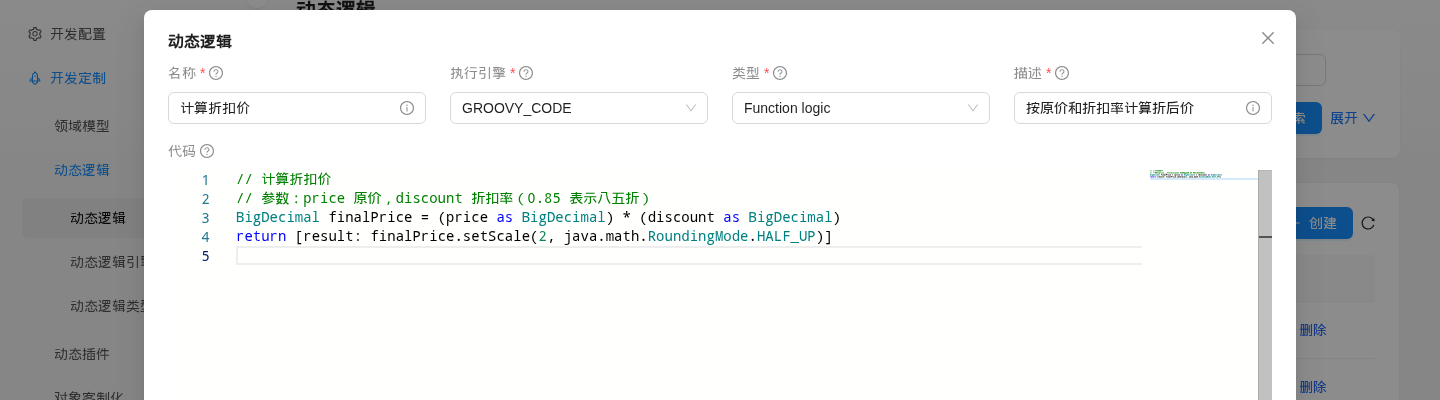
| Field | Description |
|---|---|
| Name (name) | Unique name of the logic; it cannot be changed after creation. Other objects (actions, scheduled tasks, forms, etc.) reference the logic by name or id |
| Logic engine (dynamicLogicEngine) | The engine that executes the logic; see Dynamic Logic Engines below |
| Logic type (logicType) | The scenario the logic is used in; see Dynamic Logic Types below. The dropdown shows the type's display name, for example Function logic |
| Description (description) | Required; describes what the logic is for |
| Code (code) | The logic code; its meaning depends on the logic engine |
| Revision (revision) | Shown only in the edit form. The revision number increases by 1 each time the code is modified; see Revision History |
| History revisions, Comments | Shown only in the edit form; they list the historical revisions and the comments respectively |
In addition, dynamic logic has two fields that are not shown in the UI. They can only be set through CSV seed data or the data API (POST /data/DynamicLogic, PUT /data/DynamicLogic/{id}; the paths omit the /api prefix, see Address Prefix):
| Field | Default | Description |
|---|---|---|
enableLog | false | When true, every execution of the logic through runLogic (a form's Form Hook / Data Hook, custom function calls, etc.) writes a DynamicLogicExecuteRecord execution record containing the input parameters, the return value and the exception stack trace. There is no menu for these records in the UI; you can only query the dynamic_logic_execute_record table in the database. Object actions, object hooks and scheduled tasks do not go through this path; they have their own execution records |
rateLimit | empty | Maximum number of executions per second (token-bucket rate limiting). Once exceeded, the call throws an exception with error code 1007 (RateLimitExceed). No rate limiting is applied when it is empty or not greater than 0 |
TIP
The names (name) of dynamic logic, object actions, object hooks, dynamic services and display themes cannot be changed after creation. The name of a scheduled task can be changed, but this is not recommended; see Scheduled Tasks for the reason.
# Dynamic Logic Engines
The system has 5 built-in execution engines (menu Development > Logics > Logic Engines):
| Dynamic logic engine | Description |
|---|---|
| GROOVY_CODE | Executes the Groovy script in the Code field (plain Java syntax is also supported). This engine is used in the vast majority of scenarios |
| JVM_BYTECODE | Executes precompiled JVM bytecode. The Code field holds JSON describing the bytecode and is not meant to be written by hand |
| OS_COMMAND | Designed to execute operating system commands. Not usable in the current version; see the note below |
| RENDER_LINK | Uses the same executor as GROOVY_CODE and behaves exactly the same |
| BEAN_EXECUTOR | Executes a Java/Groovy class provided by a plugin; see below |
OS_COMMAND is currently unusable
The command executed by the OS_COMMAND engine comes from an internal field that is never assigned in the current version, so execution fails immediately with an error. To call an external command, do it yourself in GROOVY_CODE logic (for example "ls -l".execute()).
# Using BEAN_EXECUTOR
BEAN_EXECUTOR lets you put the logic implementation in plugin code, which makes unit testing and IDE debugging easier:
- Implement the interface
tech.muyan.api.logic.DynamicLogicExecutorin the plugin:
package com.example.logic;

import tech.muyan.api.logic.DynamicLogicExecutor;
import java.util.Map;

public class DiscountPriceExecutor implements DynamicLogicExecutor {
  @Override
  public Map<String, ?> execute(Map<String, Object> params) {
    // params contains all variables injected for this scenario, plus two extra parameters: logicName and logicType
    return Map.of("result", "OK");
  }
}
2
3
4
5
6
7
8
9
10
11
12
- Create a dynamic logic, select
BEAN_EXECUTORas the logic engine, and fill in only the fully qualified class name in theCodefield, for examplecom.example.logic.DiscountPriceExecutor.
The platform loads the class from the plugin's ClassLoader and obtains the corresponding bean; if the class does not implement DynamicLogicExecutor, execution fails with an error. At execution time, in addition to the variables injected for the scenario, the platform passes two parameters: logicName (the logic name) and logicType (the logic type name).
# Dynamic Logic Development Guide
# Injected Variables
The code of a dynamic logic is a Groovy script. At runtime, the platform injects the context variables of the current scenario into the script. Different scenarios inject different variables; see the documentation of each scenario for details.
The following three variables are available in all GROOVY_CODE and JVM_BYTECODE logic:
| Variable | Type | Description |
|---|---|---|
application | grails.core.GrailsApplication | The current Grails application context |
invoke | Closure | Calls a custom function; see Custom Functions for usage |
logger | org.slf4j.Logger | A logger named DynamicLogic that writes to the platform backend log |
Five scenarios — object actions, object hooks, scheduled tasks, dynamic services and Webhooks — also inject a log closure. Content written with log("...") is saved in the execution log of the corresponding execution record (the column is labeled "Execute log", or "Exec log" for dynamic services and Webhooks): for object actions, object hooks, scheduled tasks and dynamic services, view it under the menus Exec History > Action, Exec History > Object Hook, Exec History > Task and Exec History > Service respectively (dynamic services only save execution records when Enable Log is turned on); Webhook execution records are opened from the Exec records column of the Webhook list. Other scenarios such as a form's Form Hook and Data Hook and custom functions have no log variable; use logger instead.
# Return Value Convention
- The return value of GROOVY_CODE / JVM_BYTECODE logic must be a
Map. If any other type is returned (includingnull, a string or a number), the platform treats the return value as an empty Map[:]. - Which keys the Map must contain is defined by each scenario; for example, object actions read
execResult, scheduled tasks readexecResult, and custom functions usually returnresult.
// Correct: return a Map
return [execResult: "处理完成"]

// Wrong: returns a string, the caller receives an empty Map
return "处理完成"
2
3
4
5
# Practical Examples
Here are some concrete business scenarios and example dynamic logic definitions:
# Automatic Customer Credit Limit Adjustment
Business scenario: when a customer is created, automatically set the credit limit based on the customer's initial credit rating.
Dynamic logic definition:
- Logic type:
OBJECT_DYNAMIC_HOOK, attached to aBefore creatingobject hook on the customer object - Code: read
object.creditRating, map the rating to a credit limit and assign it directly toobject.creditLimit. Changes that a before-create hook makes toobjectare saved together with the object; see Object Hooks for details
# Form Field Linkage
Business scenario: in the order create form, after the user selects the "order type", automatically control whether the "delivery date" is visible and required.
Dynamic logic definition:
- Logic type:
FUNCTION_LOGIC(the platform's built-in Form Hook also uses this type), configured onDynamicForm.formHook - Trigger field: set
formHookTriggerFieldstoorderType - Code: based on the values of
changedFieldsandobject, return a Map of field properties. For detailed usage, see Form Customization (Form Hook)
# Dynamic Logic Types
The system currently has the following 14 logic types (menu Development > Logics > Logic Types):
| Type | Dropdown label | Scenario |
|---|---|---|
OBJECT_DYNAMIC_HOOK | Object Dynamic Hook | Core logic of an object hook |
DYNAMIC_ACTION_ENABLE_LOGIC | Dynamic Action Enable Logic | Enable logic of an object action |
DYNAMIC_ACTION_LOGIC | Dynamic Action Logic | Core logic of an object action |
FORM_GROUP_ENABLE_LOGIC | Form Group Enable Logic | Display logic of a form field group |
WIZARD_CORE_LOGIC | Wizard Core Logic | Processing logic of a wizard |
DASHBOARD_WIDGET_ENABLE_LOGIC | Dashboard Widget Enable Logic | Enable logic of a dashboard widget |
DASHBOARD_WIDGET_CORE_LOGIC | Dashboard Widget Core Logic | Data logic of a dashboard widget |
GANTT_RENDER_LOGIC | Gantt row render logic | Gantt chart row rendering |
OBJECT_CLONE_CORE_LOGIC | Clone clone core logic | Object cloning |
DYNAMIC_SERVICE_CORE_LOGIC | Dynamic service core logic | Core logic of a dynamic service |
FUNCTION_LOGIC | Function logic | Custom functions; also used for a form's Form Hook / Data Hook |
DYNAMIC_TASK_CORE_LOGIC | Dynamic task core logic | Core logic of a scheduled task |
FIELD_DYNAMIC_HOOK | Field Dynamic Hook | Legacy type. Field-level hooks have been removed, and the platform no longer executes logic of this type |
DYNAMIC_ACTION_POST_LOGIC | Dynamic Action Post Logic | Legacy type; the platform no longer executes it |
The following pages describe in detail how dynamic logic is used in different business scenarios:
- Object Actions
- System Configuration
- Dynamic Services
- Display Themes
- Form Customization (Form Hook)
- Webhook Integration
- Object Hooks
- Object Permission Control
- Scheduled Tasks
# Custom Functions
A custom function is a dynamic logic of type FUNCTION_LOGIC. It can be called directly from other dynamic logic and is used to capture reusable calculations or business rules.
# Defining a Function
Create a dynamic logic and select Function logic as the type (see the screenshot at the beginning of this page for the create form). The following example defines a function named "计算折扣价" (calculate discounted price):
// 计算折扣价: calculate the discounted price
// Parameters: price is the original price, discount is the discount rate (0.85 means 15% off)
BigDecimal finalPrice = (price as BigDecimal) * (discount as BigDecimal)
return [result: finalPrice.setScale(2, java.math.RoundingMode.HALF_UP)]
2
3
4
The parameters passed by the caller are injected into the function code as variables; price and discount here are the parameters passed in the call. A function must also return a Map; otherwise the caller receives an empty Map.
# Calling a Function
In any GROOVY_CODE logic, call the function directly with the invoke closure injected by the platform:
// The first argument is the name of the function (dynamic logic), the second is the Map of parameters to pass
Map res = invoke("计算折扣价", [price: 199.00, discount: 0.85])
// res is the Map returned by the function, here [result: 169.15]
2
3
In plugin code, or anywhere the invoke variable is not available, you can also call it through the bean, with the same effect:
import tech.muyan.BeanHelper
import tech.muyan.api.DynamicFunctionService

Map res = BeanHelper.getBean(DynamicFunctionService).invoke("计算折扣价", [price: 199.00, discount: 0.85]) as Map
2
3
4
The following object action demonstrates the call (for how to configure object actions, see Object Actions). First create a dynamic logic "折扣价试算" (discounted price trial calculation) of type Dynamic Action Logic as the action's core logic. It calls the "计算折扣价" function and returns the result as the action's execution result:
// Call the custom function "计算折扣价"
Map res = invoke("计算折扣价", [price: 199.00, discount: 0.85])
log("函数返回:${res}")
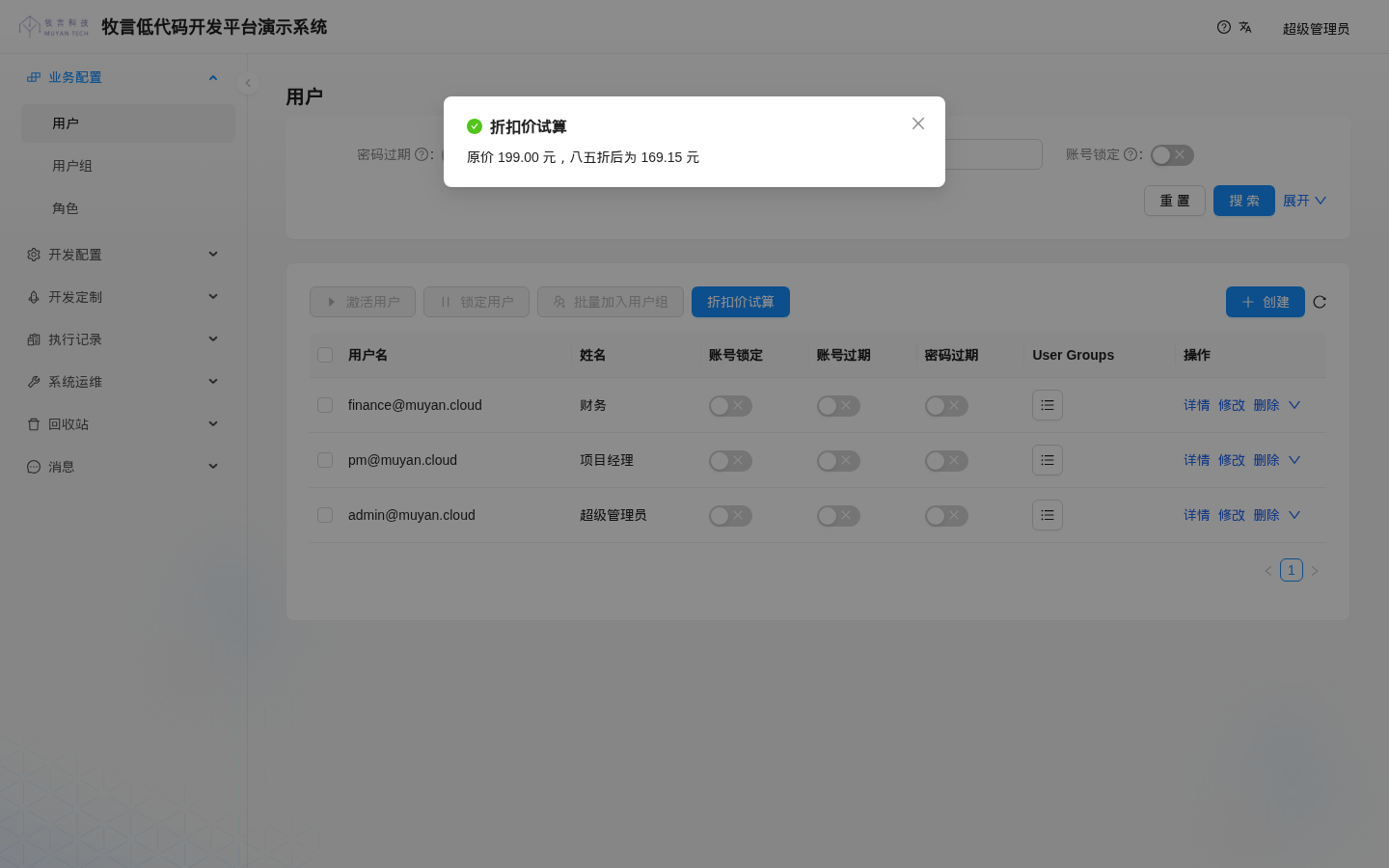
return [execResult: "原价 199.00 元,八五折后为 ${res.result} 元"]
2
3
4
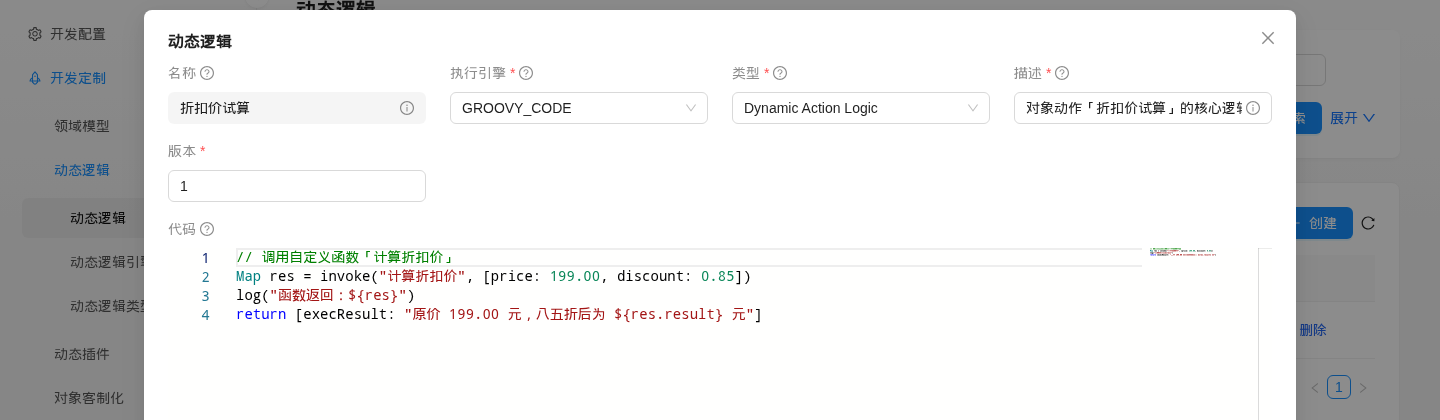
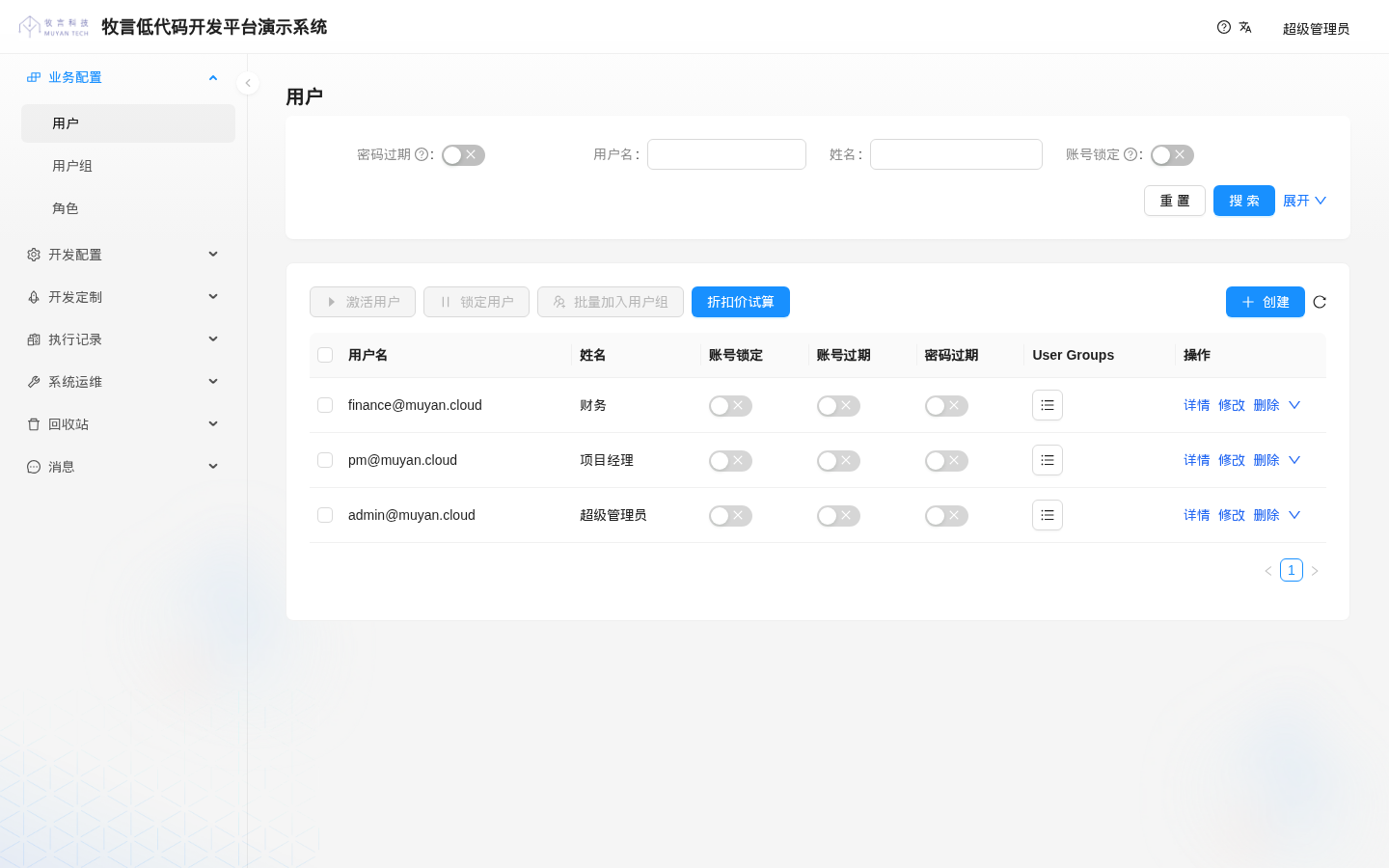
Then create a CLASS_LEVEL object action "折扣价试算", select the logic above as its core logic, and set its Ext info to {"resultType": "inContainer"} so that the execution result is shown in a modal (if it is not set, the result is shown as a message notification at the top of the page). The action must also have an access requirement (accessRequirement), otherwise it does not appear in the list. This field is not available in the UI; see Object Actions for how to set it. Finally, attach the action to the list form of "User", and a "折扣价试算" button appears above the list:
Click the button to execute it; the modal shows the discounted price calculated by the function:
WARNING
invoke looks up a dynamic logic of type FUNCTION_LOGIC by name. If none is found, it fails with ErrorCode: 15001, ErrorMsg: FunctionNotFound, ExtInfo: <function name>.
The platform loads all functions into memory at startup; creating or modifying a function afterwards updates them in sync. The current version has two known issues: after a function is deleted, or after its type is changed to another type, it can still be called by invoke until the backend restarts.
# Calling External HTTP APIs
In dynamic logic you can call the HTTP APIs of external systems directly with the JDK's built-in java.net.http.HttpClient or Groovy's URL API, with no extra dependencies. Built-in capabilities removed in 1.0, such as the LLM engine and email sending, can be replaced this way by integrating external services, for example by calling the HTTP API of an LLM service or an email service provider.
It is recommended to wrap the call in a custom function of type FUNCTION_LOGIC and have other logic call it through invoke. The function "调用外部接口" (call external API) below takes two parameters: url is the API address and payload is the request body (a Map). When payload is null, it sends a GET request; otherwise it sends a POST request in JSON format:
import groovy.json.JsonOutput
import groovy.json.JsonSlurper

import java.net.http.HttpClient
import java.net.http.HttpRequest
import java.net.http.HttpResponse
import java.time.Duration

HttpClient client = HttpClient.newBuilder()
  .connectTimeout(Duration.ofSeconds(5))
  .build()

HttpRequest.Builder builder = HttpRequest.newBuilder(URI.create(url as String))
  .timeout(Duration.ofSeconds(10))
  .header('Content-Type', 'application/json')
if (payload != null) {
  builder.POST(HttpRequest.BodyPublishers.ofString(JsonOutput.toJson(payload)))
} else {
  builder.GET()
}
HttpResponse<String> response = client.send(builder.build(), HttpResponse.BodyHandlers.ofString())
if (response.statusCode() >= 300) {
  throw new RuntimeException("外部接口返回 ${response.statusCode()}:${response.body()}")
}
// An empty response body (e.g. 204) must not be passed to JsonSlurper, otherwise it throws IllegalArgumentException
String body = response.body()
return [status: response.statusCode(), result: body ? new JsonSlurper().parseText(body) : null]
2
3
4
5
6
7
8
9
10
11
12
13
14
15
16
17
18
19
20
21
22
23
24
25
26
27
Call it from other dynamic logic. Both parameters must be passed; for a GET request, pass null as payload:
Map res = invoke("调用外部接口", [
  url    : "https://api.example.com/orders",
  payload: [orderNo: "SO-20260923-001", amount: 199.00]
])
def data = res.result   // JSON returned by the external API, already parsed into a Map / List; null when the response body is empty
2
3
4
5
If you only need a simple GET request, you can also use Groovy's URL API:
import groovy.json.JsonSlurper

String text = new URL("https://api.example.com/status").getText(
  connectTimeout: 5000,
  readTimeout: 10000,
  requestProperties: [Accept: 'application/json']
)
def data = new JsonSlurper().parseText(text)
2
3
4
5
6
7
8
Notes:
- Requests are sent from the machine (or container) where the backend service runs, so the API address must be reachable from there. In a Docker deployment,
localhostrefers to the backend container itself. - Always set timeouts. Scenarios such as object actions and Form Hooks run synchronously, so a slow external API directly slows down UI operations.
- In the example above, an exception is thrown when the external API returns a non-2xx status code, and the caller fails as a result; for example, the execution status of an object action becomes
FAILED. Usetry/catchat the call site if you need fault tolerance. - Do not put API keys in the code. You can store them in System Configuration and read them with
ConfigHelper.dynamicConfigService.getByKey("config key"), or provide them through environment variables.
# Revision History
Dynamic logic keeps a revision history:
- Each time the
Codefield is modified, the revision number increases by 1 and the previous content is saved as a historical revision, which can be viewed under "History revisions" in the edit form. - In the list of historical revisions, use "Latest revision changes" to see the differences between a historical revision and the current version, "Compare revision" to compare two selected historical revisions, and "Set as current" to restore a historical revision as the current code (rollback).
WARNING
In the current version, deleting a dynamic logic is a physical delete; deleted logic does not appear under the Trash > Logic Trash menu. For a logic that already has historical revisions, you must delete its historical revisions before you can delete it.
# Auto-Refreshing Code During Development
When the platform is started with the JVM system property -DdynamicLogic.autoRefreshSeedDataFolder=true, it reads the files in the csv subdirectory of the seed data directory whose names match ^(\d*-)?DynamicLogic(_.*)?\.csv$ (for example DynamicLogic.csv, 004-DynamicLogic.csv, DynamicLogic_task.csv). These files must contain the name(*) and code(F) columns. The platform watches the source files referenced in the code(F) column and, when a file is modified, automatically refreshes the code of the corresponding logic in the database, which is convenient for local development and debugging. Do not enable this in production.