# Object Hooks
Screenshots on this page are taken from the Chinese UI. Menu, field and button names in the text use the English UI labels.
Object hooks insert custom logic before and after an object (a domain model record) is created, updated or deleted, for example to fill in fields before creation, validate data before an update, or synchronize another system after deletion.
# Target Audience
This document is intended for developers and implementers of the system.
# Definition
Object hooks are maintained under the menu Development > Object Hooks (object DynamicObjectHook). Each execution leaves a record under Exec History > Object Hook.
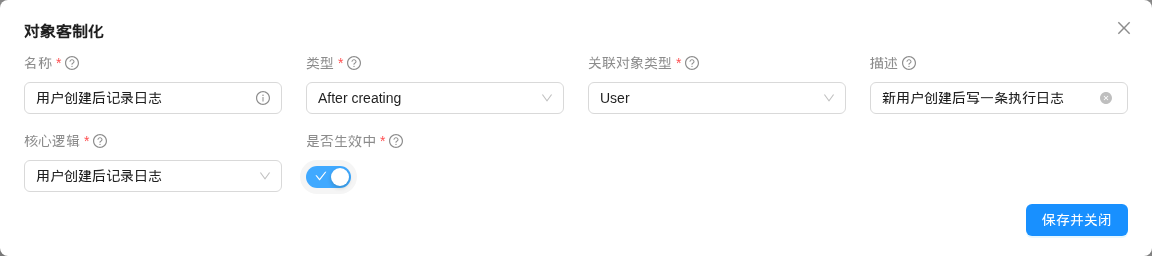
| Field | Description |
|---|---|
| name (name) | Required, unique; cannot be changed after creation |
| Hook type (hookType) | When the hook runs; see the table below. The dropdown shows the display names listed there |
| Object type (objectType) | The domain model the hook applies to; cannot be changed after creation |
| Description (description) | Description |
| Core logic (coreLogic) | A dynamic logic of type OBJECT_DYNAMIC_HOOK |
| Active (active) | Only active hooks are executed. This switch is off by default in the create form and must be turned on manually |
The values of the type (ObjectHookType) are as follows:
| Type | Dropdown label | When it runs |
|---|---|---|
BEFORE_CREATE | Before creating | Before a create is saved: the object has been built in memory but not yet saved to the database, and id is empty |
AFTER_CREATE | After creating | After a create is saved: the object has been saved and id has been generated, but the transaction has not been committed yet |
BEFORE_UPDATE | Before updating | Before an update is saved: the object has been updated with the submitted data but not yet saved to the database |
AFTER_UPDATE | After updating | After an update is saved; the transaction has not been committed yet |
BEFORE_DELETE | Before deleting | Before deletion: the object has been loaded from the database but not yet deleted |
AFTER_DELETE | After deleting | After deletion; the transaction has not been committed yet |
CREATE | Create ability | Dynamic create permission; see Object Permission Control |
UPDATE_DELETE | Update/delete ability | Dynamic update and delete permission. In the current version, the platform does not execute hooks of this type |
The header of the CSV seed data is as follows:
objectType.shortName,name(*),hookType,coreLogic.name,active,isSystem,description
TIP
- Multiple hooks can be configured for the same object and the same type. All of them are executed, and the execution order is not guaranteed.
- The platform caches the list of hooks by "object + type", and the cache is kept for at most 1 minute. After a hook is created, updated or deleted, the platform immediately refreshes the cache for the hook's current type. If you change a hook's type, the cache of the original type is not refreshed immediately, and for up to 1 minute the hook still runs as the original type.
# Injected Variables
# Create
| Variable name | Variable type | Description |
|---|---|---|
object | <? extends GormEntity> | The object instance to be created |
requestData | Map | The raw data submitted by the frontend |
userContext | tech.muyan.api.security.MuyanAuthentication | Information about the current user |
application | grails.core.GrailsApplication | The current Grails application context |
log | Closure | Prints execution logs; the content is saved to the execution record |
hookType | tech.muyan.enums.ObjectHookType | The type of the hook being executed |
# Update
| Variable name | Variable type | Description |
|---|---|---|
oldObject | <? extends GormEntity> | The object before the update, re-read from the database in a separate Session |
newObject | <? extends GormEntity> | The object instance updated with the submitted data |
requestData | Map | The raw data submitted by the frontend |
userContext | tech.muyan.api.security.MuyanAuthentication | Information about the current user |
application | grails.core.GrailsApplication | The current Grails application context |
log | Closure | Prints execution logs; the content is saved to the execution record |
hookType | tech.muyan.enums.ObjectHookType | The type of the hook being executed |
# Delete
| Variable name | Variable type | Description |
|---|---|---|
object | <? extends GormEntity> | The object to be deleted |
userContext | tech.muyan.api.security.MuyanAuthentication | Information about the current user |
application | grails.core.GrailsApplication | The current Grails application context |
log | Closure | Prints execution logs; the content is saved to the execution record |
hookType | tech.muyan.enums.ObjectHookType | The type of the hook being executed |
# Return Value and Exception Handling
The return value of create, update and delete hooks is only recorded in the execution record; the platform does not use it to modify the object. To modify data, change the object (create) or newObject (update) instance directly in a "before save" hook, and the changes are saved together with the current operation:
// BEFORE_CREATE: default credit limit for new customers
if (object.creditLimit == null) {
  object.creditLimit = 10000
}
2
3
4
Hook code can interrupt the operation or issue a warning by throwing an exception. The platform decides based on the exception's actual class name; subclasses are not recognized:
| Exception thrown | Result |
|---|---|
tech.muyan.exception.CustomLogicInterruptException | The operation is interrupted, the transaction is rolled back, and the exception message is shown to the user as an error. The status of the execution record is SUCCESS (an intentional interruption does not count as an execution failure) |
tech.muyan.exception.CustomLogicWarningException | The operation continues, and the exception message is shown to the user as a warning. The status of the execution record is SUCCESS_WITH_WARNING |
| Any other exception (including subclasses of the two classes above) | The operation is interrupted, the transaction is rolled back, and the status of the execution record is FAILED; the error message shown to the user contains the class name and message of the original exception |
// BEFORE_DELETE: approved documents cannot be deleted
if (object.status == 'APPROVED') {
  throw new tech.muyan.exception.CustomLogicInterruptException("已审核的单据不能删除")
}
2
3
4
# Execution Records
Each object hook execution is written to DynamicObjectHookExecRecord. Under Exec History > Object Hook you can view the execution parameters, execution result, execution log, status and stack trace. This record is independent of the dynamic logic's enableLog setting.
TIP
Since 1.0, the "Object render" hook type (customizing data returned by APIs) has been removed. To rewrite the data returned by APIs, use the form's Data Hook.