# Object Delete Permission
Screenshots on this page are taken from the Chinese UI. Menu, field and button names in the text use the English UI labels.
# Grant Users the Object Delete Permission
In steps 1 and 3, we did not set a delete permission on Customers and SalesOpportunities, so the lists have no Delete operation. The create/read/update/delete permissions of a model are controlled by four role requirements on the domain model. Fill in USER in the last column (deleteRoleRequirement.name) of these two lines in DomainClass_crm.csv:
shortName(*),extInfo,createRoleRequirement.name,readRoleRequirement.name,updateRoleRequirement.name,deleteRoleRequirement.name
;; CRM tutorial: customers, sales opportunities, interaction records, tasks
Customers,,USER,USER,USER,USER
InteractionRecords,,USER,USER,USER,USER
Tasks,,USER,USER,USER,USER
SalesOpportunities,,USER,USER,USER,USER
2
3
4
5
6
After restarting the backend service, every row of the customer and sales opportunity lists has a Delete operation.
TIP
Before 1.0, deletion was controlled through RequestMap (permissions configured by API URL). RequestMap has been removed since 1.0 and replaced by createRoleRequirement, readRoleRequirement, updateRoleRequirement and deleteRoleRequirement on the domain model.
# Run the Batch Delete Action
Delete on a row deletes only one record at a time. The system has a built-in batch delete action DeleteMultipleObjects (shown as Delete Selected in the UI). Once it is bound to a list form, a batch delete button appears above the list.
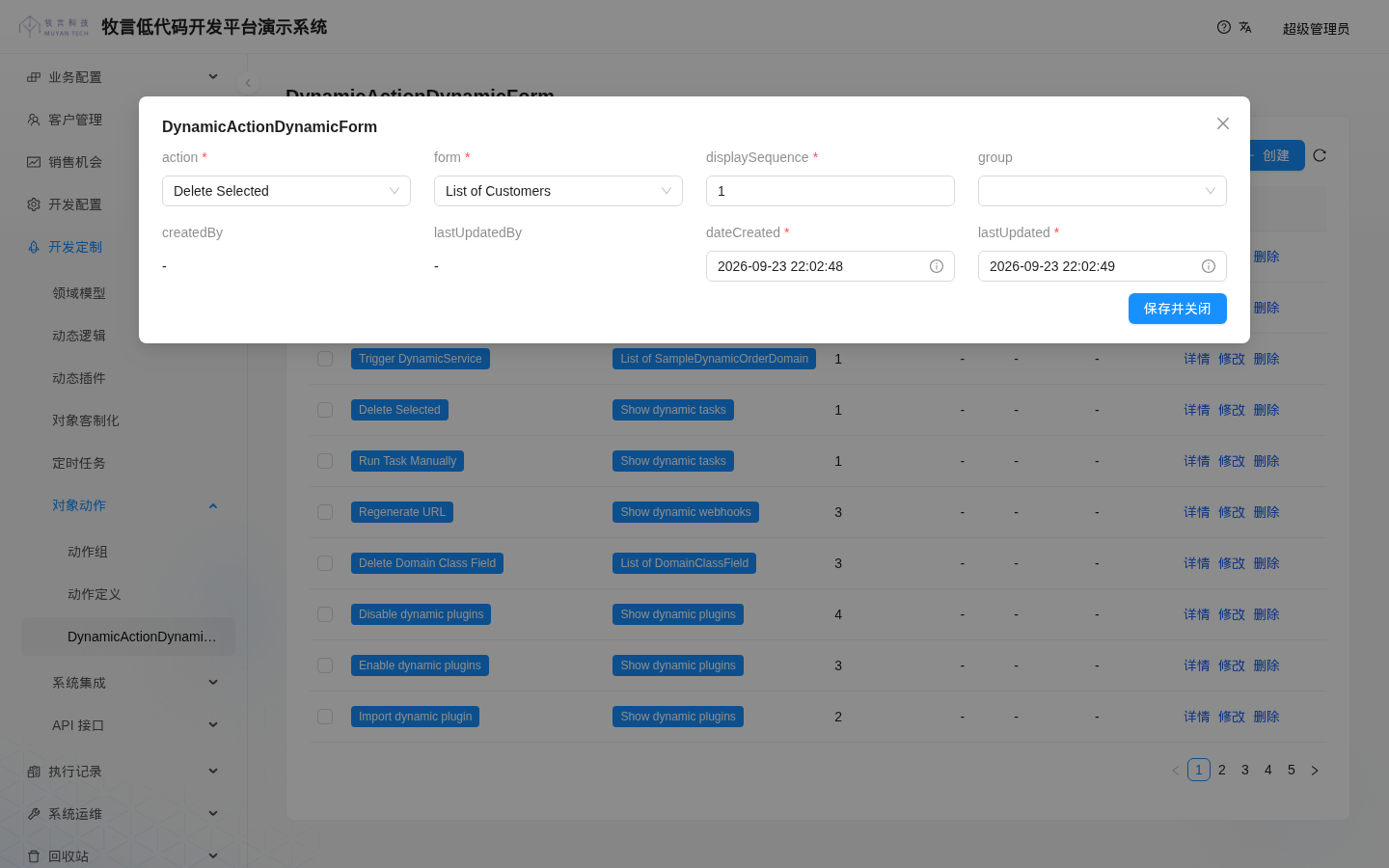
Actions are bound per form: open Development > Actions > DynamicActionDynamicForm, click Create, and fill in:
| Field | Value |
|---|---|
| action | Delete Selected |
| form | List of Customers |
| displaySequence | 1 |
| group | Leave empty |
WARNING
In 1.0.0-beta18, this create window shows all fields of the model directly: the field titles are the raw field names, and the four audit fields createdBy, lastUpdatedBy, dateCreated and lastUpdated are also shown. dateCreated and lastUpdated are marked as required, and leaving them empty gives the message "Field dateCreated cannot be null". Pick any time in these two date boxes (for example click Now) to save; the system overwrites them with the actual time when saving.
The same binding can also be written in CSV. For example, to bind batch delete to the sales opportunity list, create DynamicActionDynamicForm_crm.csv under codes/data/csv:
action.name(*),form.name(*),displaySequence,group.name
;; CRM tutorial: bind the batch delete action to the sales opportunity list
DeleteMultipleObjects,List of SalesOpportunities,1,
2
3
Note that the CSV refers to the action by its name (DeleteMultipleObjects), while the UI drop-down shows the action's label (Delete Selected).
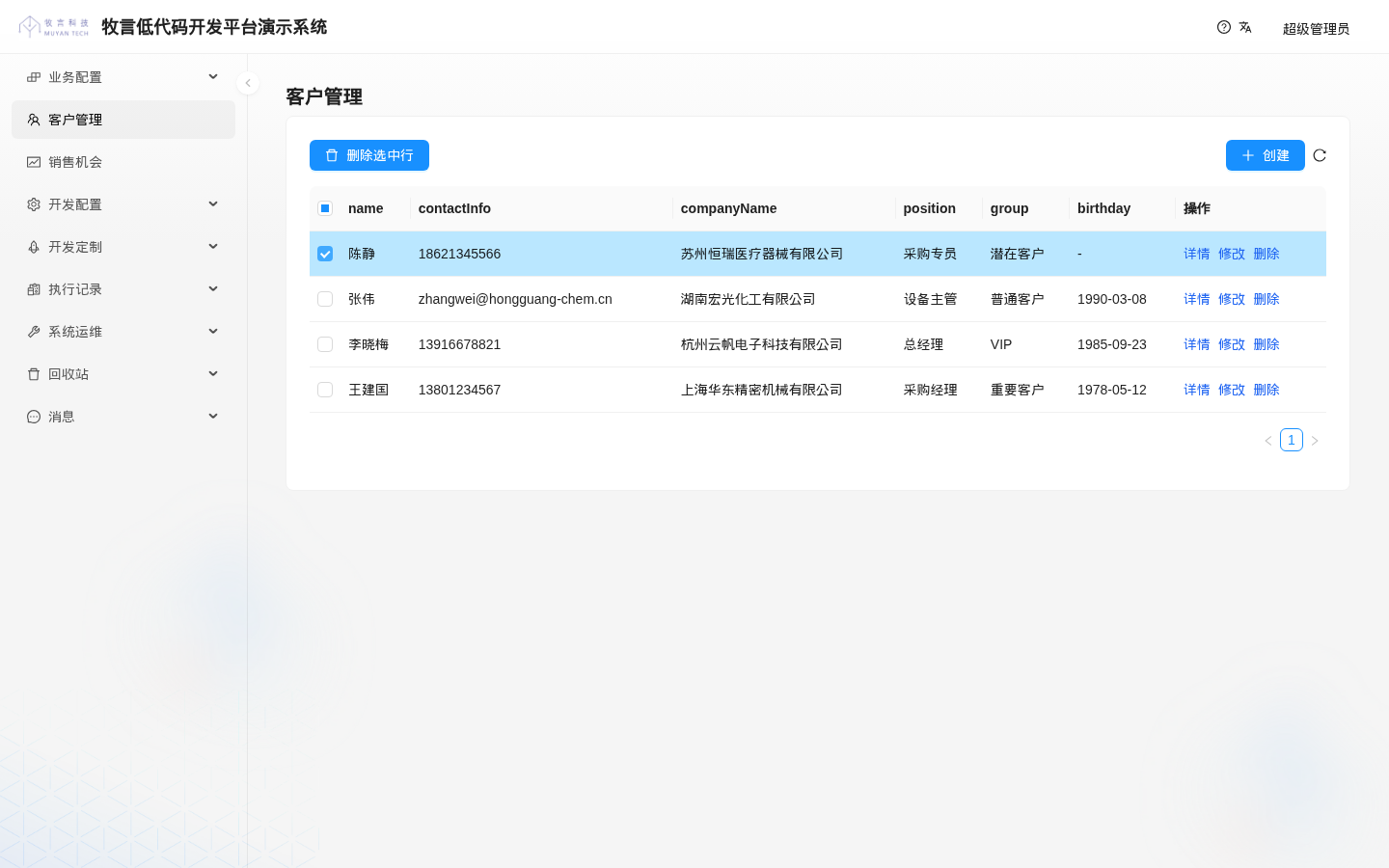
After binding, go to 客户管理, select the customers to delete, click Delete Selected, and confirm to delete them in batch:
Known issue in 1.0.0-beta18
The batch delete action only checks whether the executor meets the access permission of the action itself (USER) and does not check the model's delete permission (deleteRoleRequirement): even if a model has no delete permission, data can still be deleted through this action. Until this issue is fixed, bind it only to lists of models that already allow deletion.
The confirmation dialog shown after clicking has the title "Delete Selected" and the content "Confirm to delete selected object(s)? this operation can not be undo". Click OK to perform the deletion.
Object actions are one of the core concepts of the Muyan low-code platform. Besides the built-in actions, you can write your own actions with dynamic logic; see the object action document under "Further Reading" below. In addition, the system supports configuring custom logic for role requirements (RoleRequirement) to decide at runtime whether a user has a permission; see the object permission control document for details.
Next, we will customize the labels and display controls of some fields. Continue with the Form Field Display Optimization chapter.
# Further Reading
Our platform is the Muyan low-code platform, designed to help users build information systems quickly. To learn more about our platform, visit Muyan Low-Code Platform (opens new window).