# Form Field Display Optimization
Screenshots on this page are taken from the Chinese UI. Menu, field and button names in the text use the English UI labels.
In the previous steps, we only created forms and did not add any fields to them. In that case, the system shows all fields of the model, with the field names as titles (for example contactInfo), and picks the default control by field type, for example a single-line input for strings and a number input for numbers.
This chapter adds form fields (DynamicFormField) to the forms, sets Chinese labels, and customizes the display controls of the following fields:
| Model | Field | Forms | Display control (displayType) |
|---|---|---|---|
| Customers | contactInfo | Create, edit | Long text (text) |
| SalesOpportunities | expectedAmount | List, create, edit | Currency (currency) |
WARNING
As soon as a form defines any form field, it shows only the defined fields; undefined fields are no longer shown. So when you add fields to a form, add every field that should be displayed.
# Add Form Fields in the UI
Open System Config > Forms > Fields, click Create, and add the contact info field to the create-customer form:
| Field | Value |
|---|---|
| Form | Create Customers |
| Field type | Static field (a field of the model; use Transient field for temporary form parameters) |
| Field name | contactInfo |
| Label | 联系方式 |
| Help text | 手机号、座机或邮箱,可填写多个 |
| Display Type | text |
| Nullable | Off |
| Display sequence | 20 |
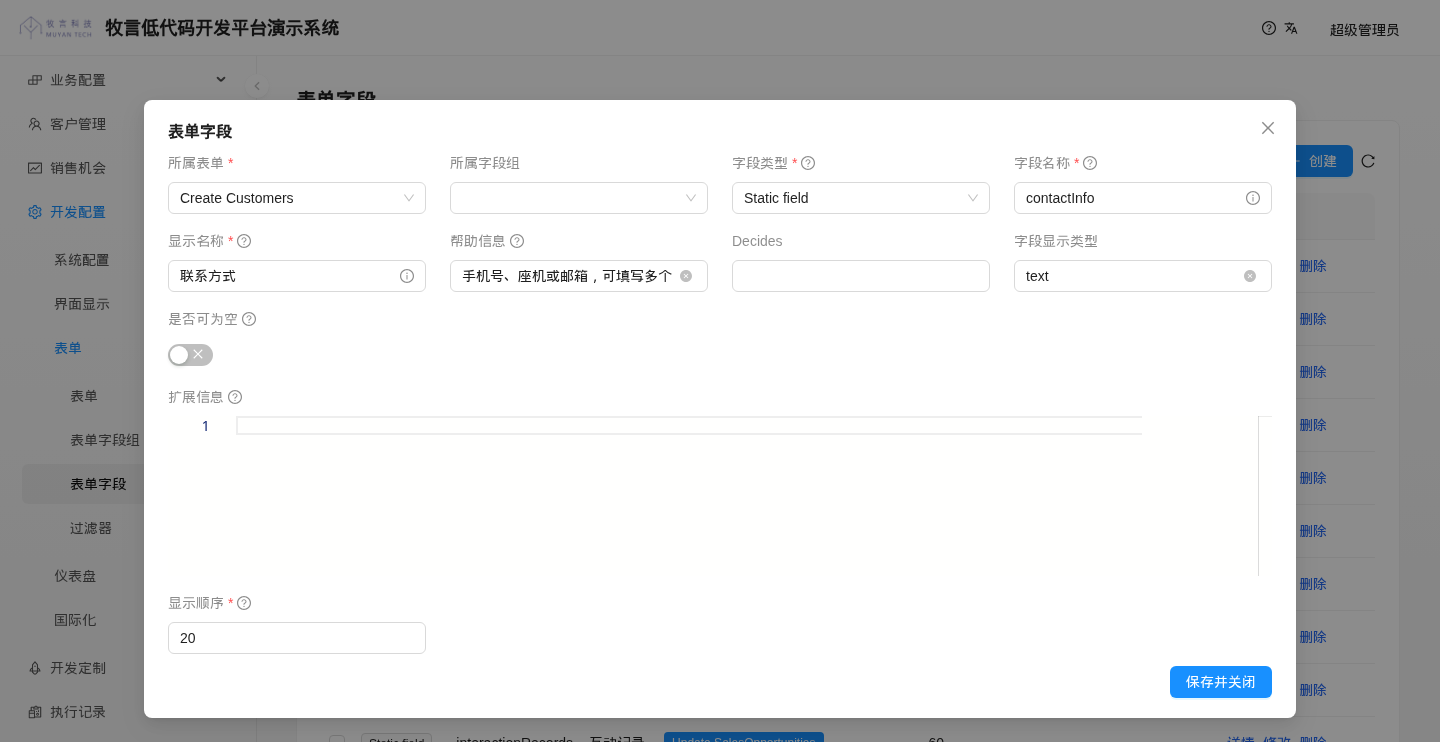
Display Type corresponds to displayType; when it is empty, the default control for the field type is used. The actual height of the Extend information editor in the window is about 70% of the browser viewport height; it has been made shorter in the screenshot above for readability. Decides (fields refreshed in linkage) does not need to be filled in for this tutorial.
# Add Form Fields in Batch with CSV
The three customer forms and three sales opportunity forms have dozens of fields in total. Adding them one by one in the UI is tedious, so you can import them all at once with CSV. Create DynamicFormField_crm.csv under codes/data/csv:
form.name(*),fieldName(*),displaySequence,label,helpText,fieldType,nullable,displayType
;; CRM tutorial: customer form fields
List of Customers,name,10,客户姓名,,STATIC_FIELD,N,
List of Customers,contactInfo,20,联系方式,,STATIC_FIELD,N,
List of Customers,companyName,30,公司名称,,STATIC_FIELD,Y,
List of Customers,position,40,职位,,STATIC_FIELD,Y,
List of Customers,group,50,客户分组,,STATIC_FIELD,Y,
List of Customers,birthday,60,生日,,STATIC_FIELD,Y,
Create Customers,name,10,客户姓名,,STATIC_FIELD,N,
Create Customers,contactInfo,20,联系方式,手机号、座机或邮箱,可填写多个,STATIC_FIELD,N,text
Create Customers,companyName,30,公司名称,,STATIC_FIELD,Y,
Create Customers,position,40,职位,,STATIC_FIELD,Y,
Create Customers,group,50,客户分组,,STATIC_FIELD,Y,
Create Customers,birthday,60,生日,,STATIC_FIELD,Y,
Update Customers,name,10,客户姓名,,STATIC_FIELD,N,
Update Customers,contactInfo,20,联系方式,手机号、座机或邮箱,可填写多个,STATIC_FIELD,N,text
Update Customers,companyName,30,公司名称,,STATIC_FIELD,Y,
Update Customers,position,40,职位,,STATIC_FIELD,Y,
Update Customers,group,50,客户分组,,STATIC_FIELD,Y,
Update Customers,birthday,60,生日,,STATIC_FIELD,Y,
;; CRM tutorial: sales opportunity form fields
List of SalesOpportunities,name,10,机会名称,,STATIC_FIELD,N,
List of SalesOpportunities,customer,20,客户,,STATIC_FIELD,N,
List of SalesOpportunities,stage,30,机会阶段,,STATIC_FIELD,N,
List of SalesOpportunities,expectedAmount,40,预期金额,,STATIC_FIELD,N,currency
List of SalesOpportunities,expectedCloseDate,50,预计关闭日期,,STATIC_FIELD,N,
List of SalesOpportunities,interactionRecords,60,互动记录,,STATIC_FIELD,Y,
List of SalesOpportunities,tasks,70,任务,,STATIC_FIELD,Y,
Create SalesOpportunities,name,10,机会名称,,STATIC_FIELD,N,
Create SalesOpportunities,customer,20,客户,,STATIC_FIELD,N,
Create SalesOpportunities,stage,30,机会阶段,,STATIC_FIELD,N,
Create SalesOpportunities,expectedAmount,40,预期金额,,STATIC_FIELD,N,currency
Create SalesOpportunities,expectedCloseDate,50,预计关闭日期,,STATIC_FIELD,N,
Create SalesOpportunities,interactionRecords,60,互动记录,,STATIC_FIELD,Y,
Create SalesOpportunities,tasks,70,任务,,STATIC_FIELD,Y,
Update SalesOpportunities,name,10,机会名称,,STATIC_FIELD,N,
Update SalesOpportunities,customer,20,客户,,STATIC_FIELD,N,
Update SalesOpportunities,stage,30,机会阶段,,STATIC_FIELD,N,
Update SalesOpportunities,expectedAmount,40,预期金额,,STATIC_FIELD,N,currency
Update SalesOpportunities,expectedCloseDate,50,预计关闭日期,,STATIC_FIELD,N,
Update SalesOpportunities,interactionRecords,60,互动记录,,STATIC_FIELD,Y,
Update SalesOpportunities,tasks,70,任务,,STATIC_FIELD,Y,
;; CRM tutorial: sub-tables (interaction records, tasks) take their columns from their own LIST forms
List of InteractionRecords,name,10,主题,,STATIC_FIELD,N,
List of InteractionRecords,interactionType,20,互动类型,,STATIC_FIELD,N,
List of InteractionRecords,interactionDate,30,互动日期,,STATIC_FIELD,N,
List of InteractionRecords,notes,40,备注,,STATIC_FIELD,Y,
List of Tasks,name,10,任务名称,,STATIC_FIELD,N,
List of Tasks,description,20,任务描述,,STATIC_FIELD,N,
List of Tasks,dueDate,30,截止日期,,STATIC_FIELD,N,
List of Tasks,status,40,状态,,STATIC_FIELD,N,
2
3
4
5
6
7
8
9
10
11
12
13
14
15
16
17
18
19
20
21
22
23
24
25
26
27
28
29
30
31
32
33
34
35
36
37
38
39
40
41
42
43
44
45
46
47
48
49
50
51
- Form fields are looked up by the two columns
form.name(*)andfieldName(*). The "Create Customers / contactInfo" field created in the UI in the previous section is updated by the corresponding line instead of being created again. fieldTypeSTATIC_FIELDmeans a field of the model.- The column titles of the sub-tables in the sales opportunity forms come from the child objects' LIST forms, so Chinese labels are also set for
List of InteractionRecordsandList of Tasksat the end.
Save the file and restart the backend service.
# Result
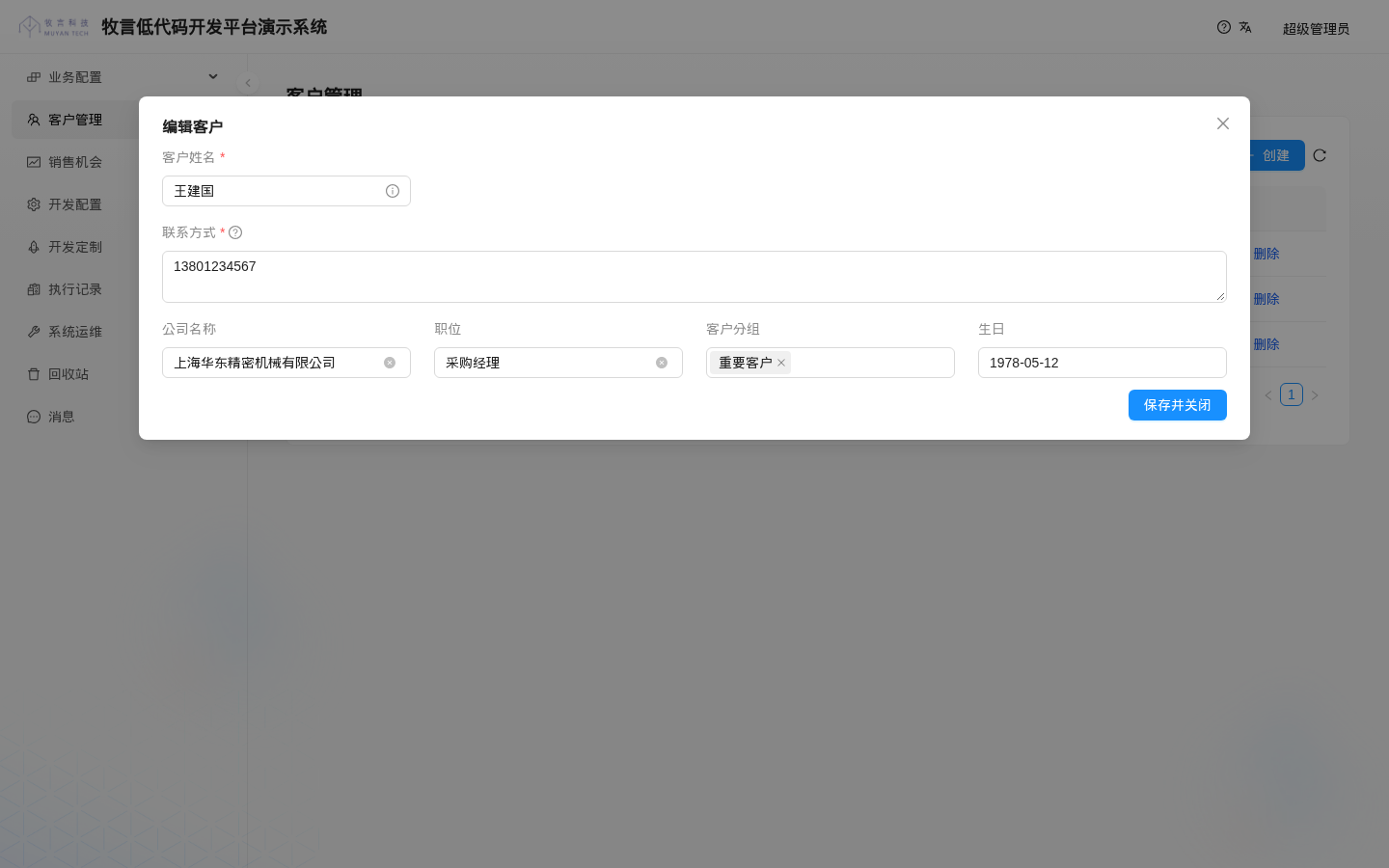
When editing a customer, the contact info becomes a multi-line text box and all fields show Chinese labels:
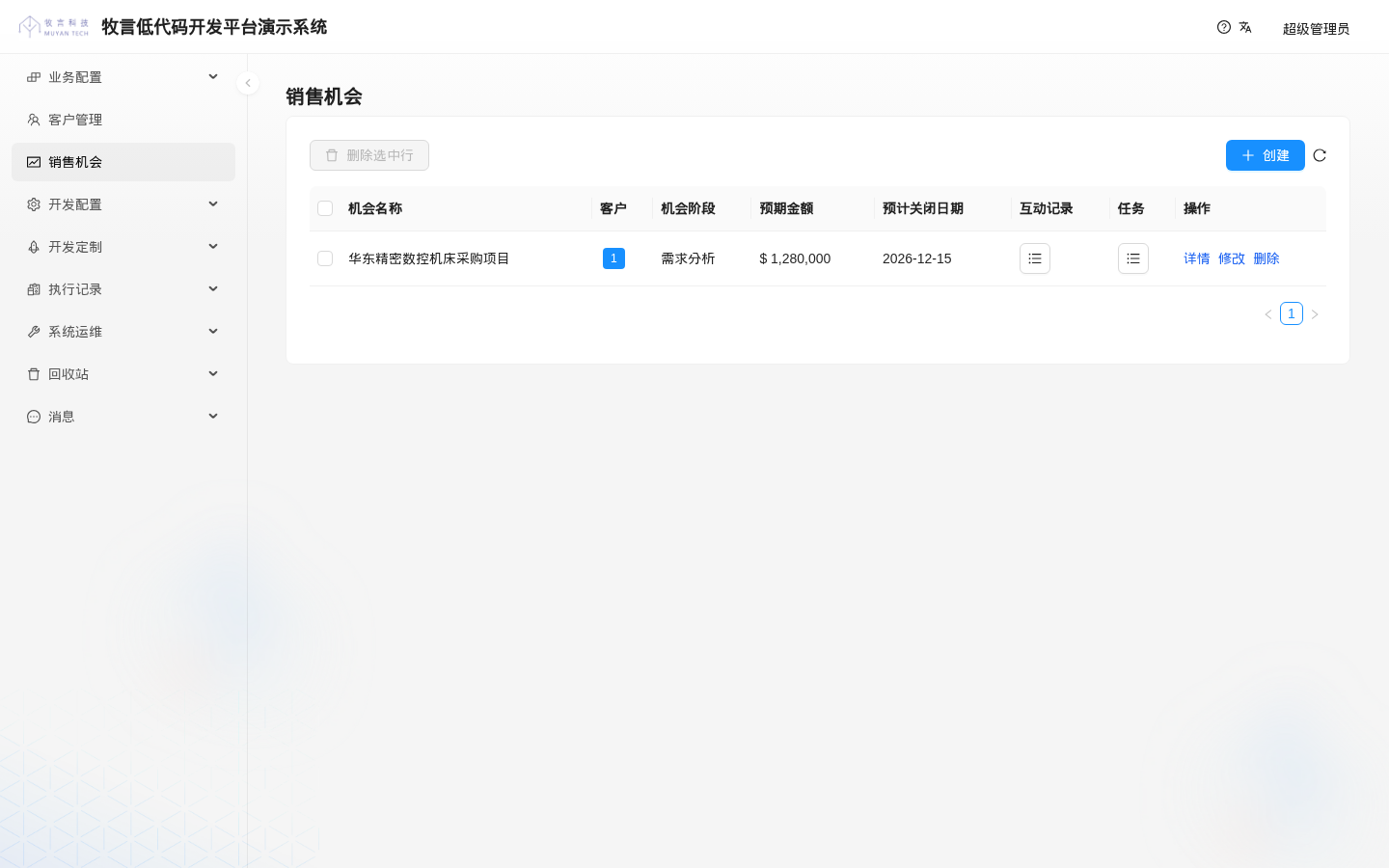
In the sales opportunity list, the expected amount is shown in currency format:
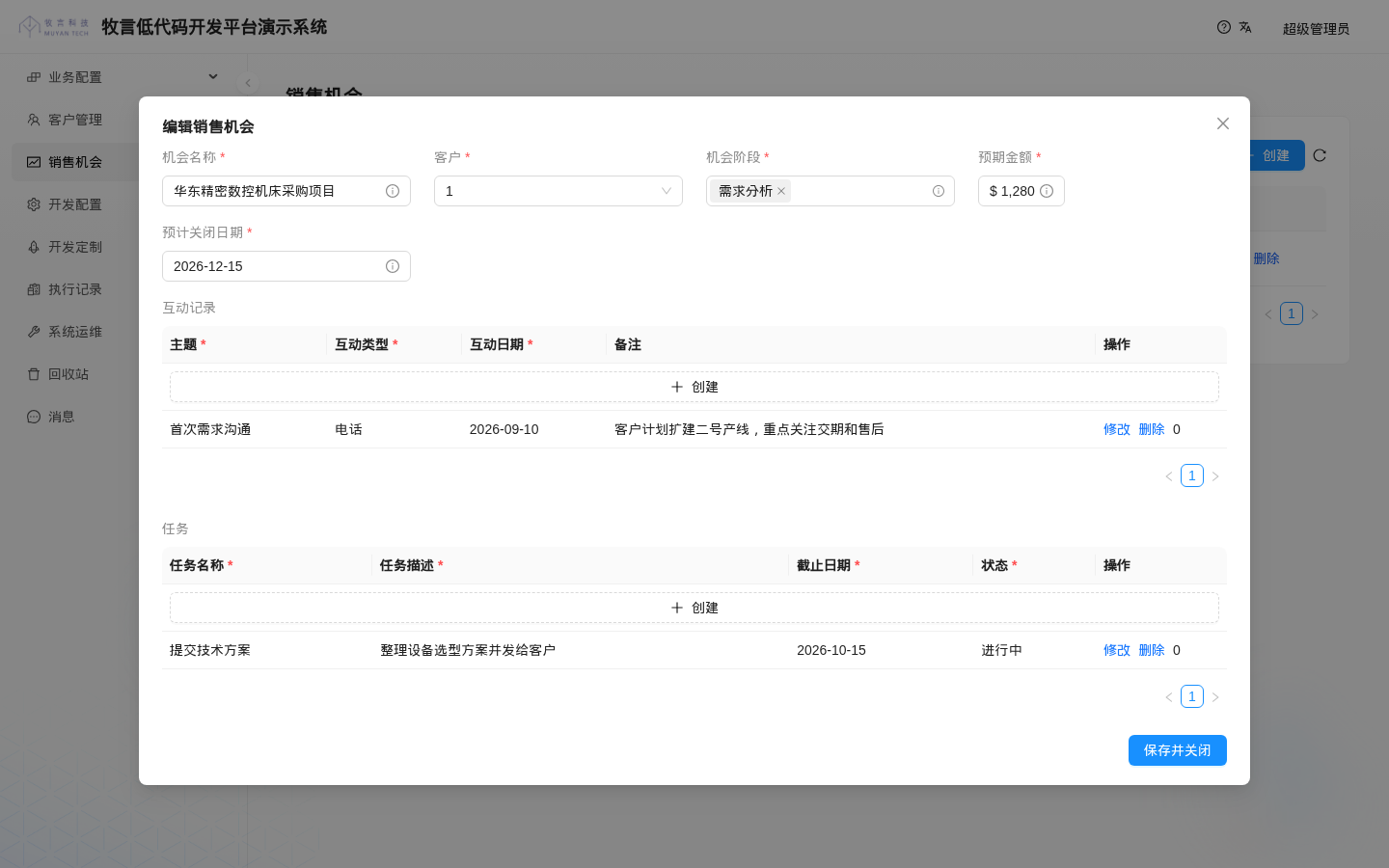
When editing a sales opportunity, the column titles of the sub-tables are also in Chinese:
WARNING
In 1.0.0-beta18, the currency control always uses the dollar sign $ as the prefix, and in edit mode the input box is narrow, so large amounts are not fully displayed (for example, 1,280,000 in the screenshot above only shows as $ 1,280). If you need RMB display, use the default number control for now (leave displayType empty).
For the list of displayType values supported by default, see the list below:
| key | Control |
|---|---|
id | Identifier |
string | Single-line text |
text | Multi-line text |
password | Password |
integer, int, long | Integer |
decimal | Decimal |
percentage | Percentage |
currency | Currency |
date | Date |
dateRange | Date range |
datetime | Date and time |
zonedDatetime | Date and time with time zone |
boolean | Switch |
enum | Enum dropdown |
httpMethod | HTTP method (enum dropdown) |
valueSelect | Value select |
link | Link; use link in extInfo to set the display text and how it opens |
progress | Progress bar |
icon | Icon |
treeSelect | Tree select |
roles | Roles |
code | Code editor |
json | JSON editor |
markdown | Markdown editor |
stacktrace | Stack trace |
functionEditor | Function editor |
file | Single file |
fileList | Multiple files |
image | Image |
video | Video |
object | Single object select |
objects | Multiple object select |
genericObject, genericObjects | Read-only display of objects of any type |
array | List of one-to-many associated objects |
subTable | Sub-table, see Advanced Field Controls |
relativeSubTable | Sub-table displayed by association path, see Advanced Field Controls |
authentication | Read-only display of user information (such as the creator) |
popOverSteps | Step status |
lineChart | Line chart |
tableChart | Table chart |
With that, a simple CRM with customers, sales opportunities, interaction records and tasks is complete.
To turn this CRM into a plugin that can be installed in other environments in one go, you also need to write the forms, menus and action bindings created in the UI as CSV (add columns such as label, objectType.shortName(*) and type.name(*) to DynamicForm.csv, plus DynamicMenu.csv and DynamicActionDynamicForm.csv). The DynamicForm_crm.csv in this tutorial only updates the access permissions of existing forms and fails to import in a new environment that does not have these forms. For the columns of each file, see CSV Import Templates.