# Customer Object Modeling
Screenshots on this page are taken from the Chinese UI. Menu, field and button names in the text use the English UI labels.
Business model design is the foundation of information system design. It covers defining database tables, their fields, and the relationships between tables. In short, this step determines the system's data structure and how data is stored.
Customers are one of the core objects managed by a CRM system, so we start by creating the customer model.
# Customer Model Definition
# Model Name
| Model Name | Description |
|---|---|
| Customers | Customer information, including name, contact info, company name, position, etc. |
# Model Field List
| Field Name | Type | Nullable | Options | Remarks |
|---|---|---|---|---|
| name | STRING | No | None | Customer name |
| contactInfo | STRING | No | None | Contact info |
| companyName | STRING | Yes | None | Company name |
| position | STRING | Yes | None | Position |
| group | STRING | Yes | VIP, 普通客户, 潜在客户, 重要客户, 黑名单 | Customer group |
| birthday | LOCAL_DATE | Yes | None | Customer birthday |
TIP
The system automatically creates an auto-increment primary key column named id of type Long for every dynamic model. You do not need to define it in the field list.
# Create the Model with CSV
The Development > Classes page only supports viewing and modifying; it has no Create button. New models are defined with seed data CSV. Create the following two files in the codes/data/csv directory.
DomainClass_crm.csv: defines the model itself and its create/read/update/delete permissions.
shortName(*),extInfo,createRoleRequirement.name,readRoleRequirement.name,updateRoleRequirement.name,deleteRoleRequirement.name
;; CRM tutorial: customer model
Customers,,USER,USER,USER,
2
3
shortName(*)is the model name.(*)means existing records are looked up by this column: if one is found it is updated, otherwise a new one is created.- The last four columns are the role requirements (RoleRequirement) needed to create, view, modify and delete. The platform has three built-in role requirements,
USER,DEVELOPERandADMIN, corresponding to the rolesROLE_USER,ROLE_DEVELOPERandROLE_ADMIN;ROLE_ADMINincludesROLE_DEVELOPER, andROLE_DEVELOPERincludesROLE_USER. - Leaving a permission empty means nobody has that permission (including administrators). The delete permission is deliberately left empty here and is granted in step 4.
DomainClassField_crm.csv: defines the model's fields.
domainClass.shortName(*),name(*),dataType,referenceDomain.shortName,nullable,editable,defaultValue,options
;; CRM tutorial: customer model fields
;; name customer name / contactInfo contact info / companyName company name / position job title / group customer group / birthday customer birthday
Customers,name,STRING,,false,true,,
Customers,contactInfo,STRING,,false,true,,
Customers,companyName,STRING,,true,true,,
Customers,position,STRING,,true,true,,
Customers,group,STRING,,true,true,,"[""VIP"",""普通客户"",""潜在客户"",""重要客户"",""黑名单""]"
Customers,birthday,LOCAL_DATE,,true,true,,
2
3
4
5
6
7
8
9
- For the values of
dataType, see the DomainClassField section in CSV Import Templates. optionsis the list of allowed values, written as a JSON array. Because the content contains commas and double quotes, wrap the whole cell in double quotes and double every inner double quote. A field with options can only take values from those options in forms (in 1.0.0-beta18 the default form shows it as a multi-select tag input, see step 2).- Lines starting with
;;are comments and are ignored during import.
WARNING
Do not fill in the comment column of DomainClassField in 1.0.0-beta18: if it is filled, the database comment statement generated by the platform lacks quotes, the field fails to be created, and the lines after it in the same file are not imported either.
After saving both files, restart the backend service (for example docker compose restart server). On startup the service imports DomainClass first and then DomainClassField, creating the table and adding the columns automatically.
# Check the Result
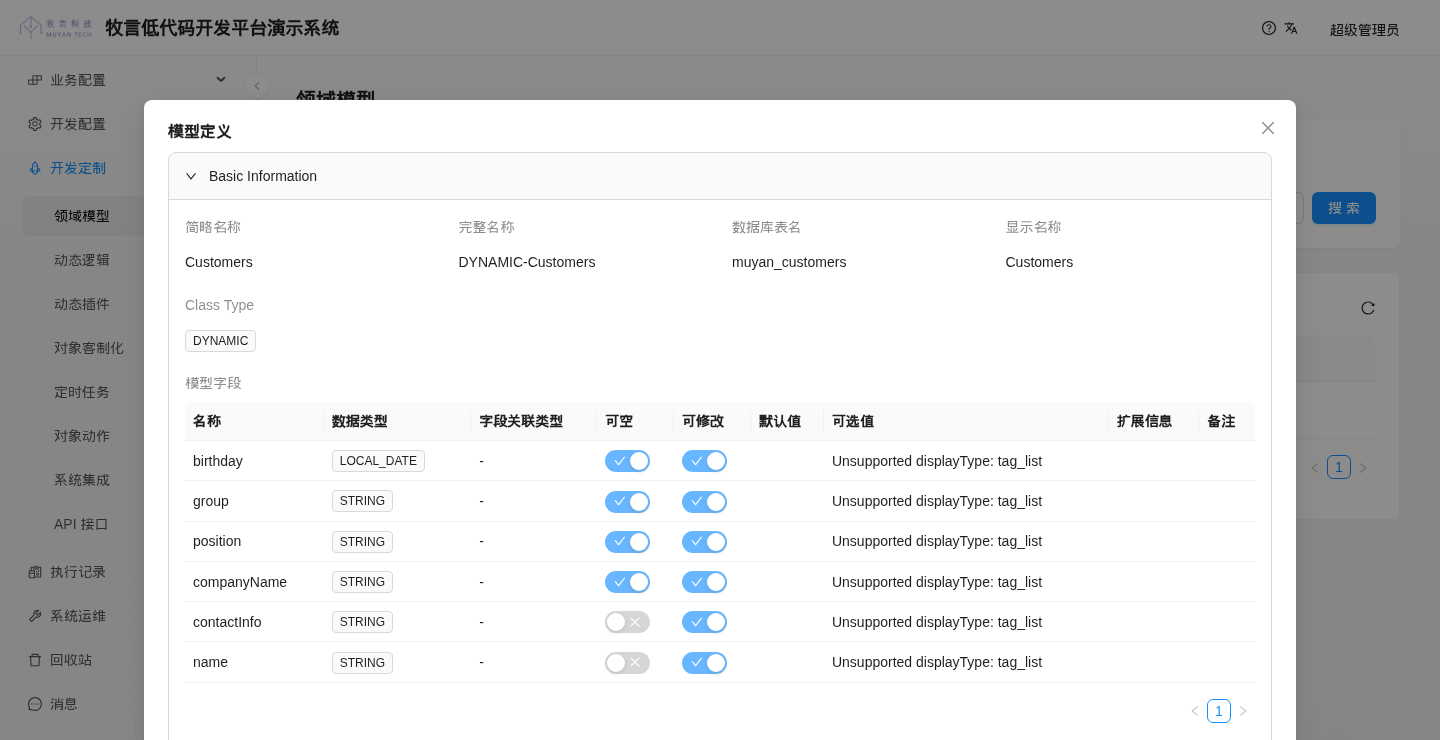
Open Development > Classes. Customers appears in the list. Click Details to see the fields you just defined:
WARNING
In 1.0.0-beta18, in the field sub-table of the domain model details and update pages, the Options column shows Unsupported displayType: tag_list (the frontend has no such display control), so options cannot be viewed or edited in the UI. Treat the CSV as the source of truth for options.
If the model does not appear, go to Exec History > Import and check the status and failed lines of the two import records Domain Class and Domain Class Field.
Next, we will create maintenance forms for the customer model. Please click here to continue.
# Further Reading
Our platform is the Muyan low-code platform, designed to help users build information systems quickly. To learn more about our platform, visit Muyan Low-Code Platform (opens new window).