# Plugin Development Development
Screenshots on this page are taken from the Chinese UI. Menu, field and button names in the text use the English UI labels.
Plugins are one of the extension mechanisms the platform provides. With plugins you can add new features to the platform or modify existing ones. A plugin can contain Java/Groovy code, seed data (CSV files for domain classes, forms, menus, dynamic logic and so on) and frontend components.
# Plugin Management
A plugin is a file ending in .myp. Menu: Development > Plugins.
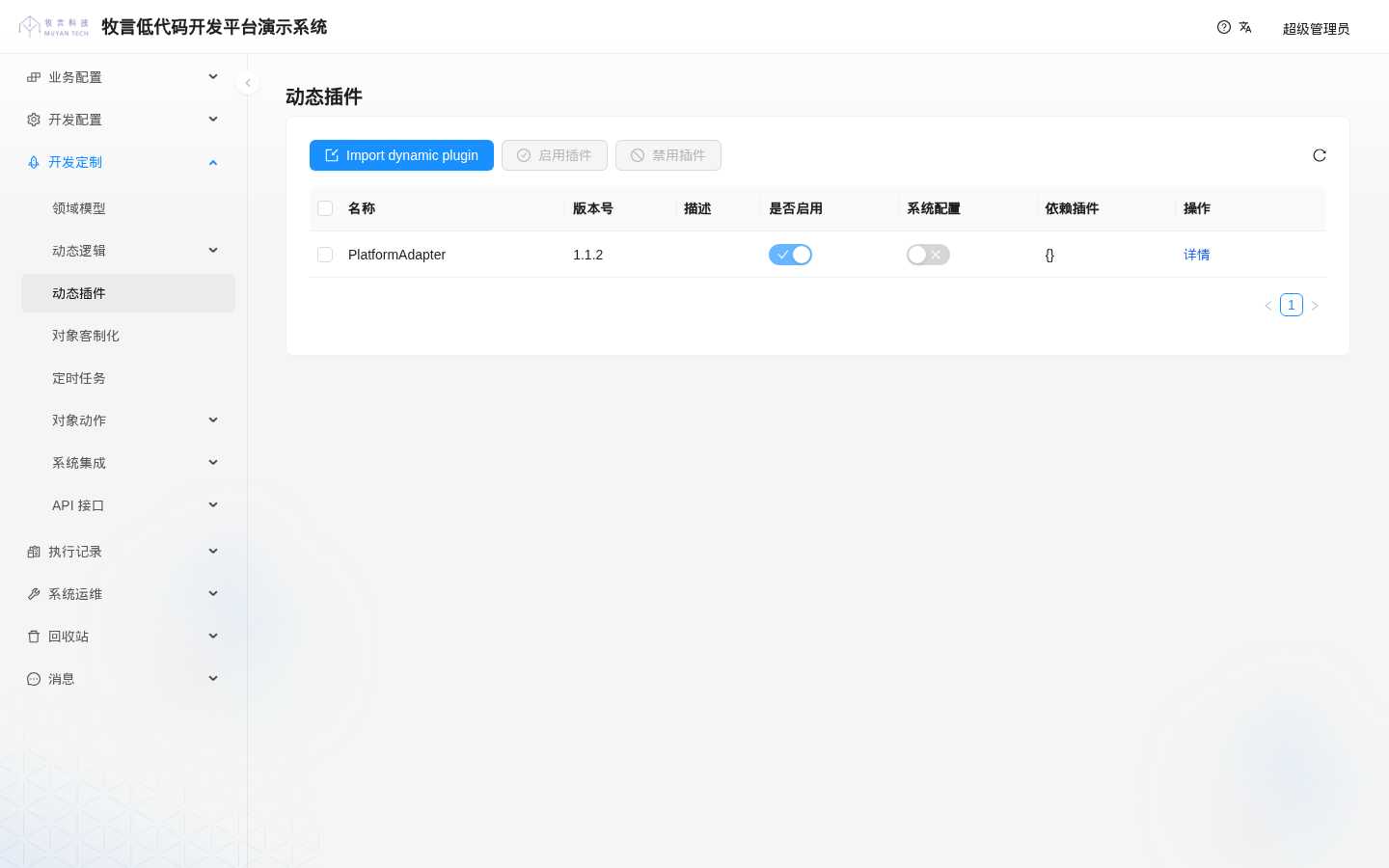
The list shows the name, version, description, enabled state, system flag, dependent plugins and other information of the imported plugins. PlatformAdapter is a built-in platform plugin; do not disable it.
The Is system column corresponds to the plugin's isSystem property. It is only a flag: the current platform source code does not treat plugins differently based on it, so it can be ignored.
# Importing a Plugin
Click Import dynamic plugin, upload the plugin file in the panel that opens, and click Submit in the upper-right corner:
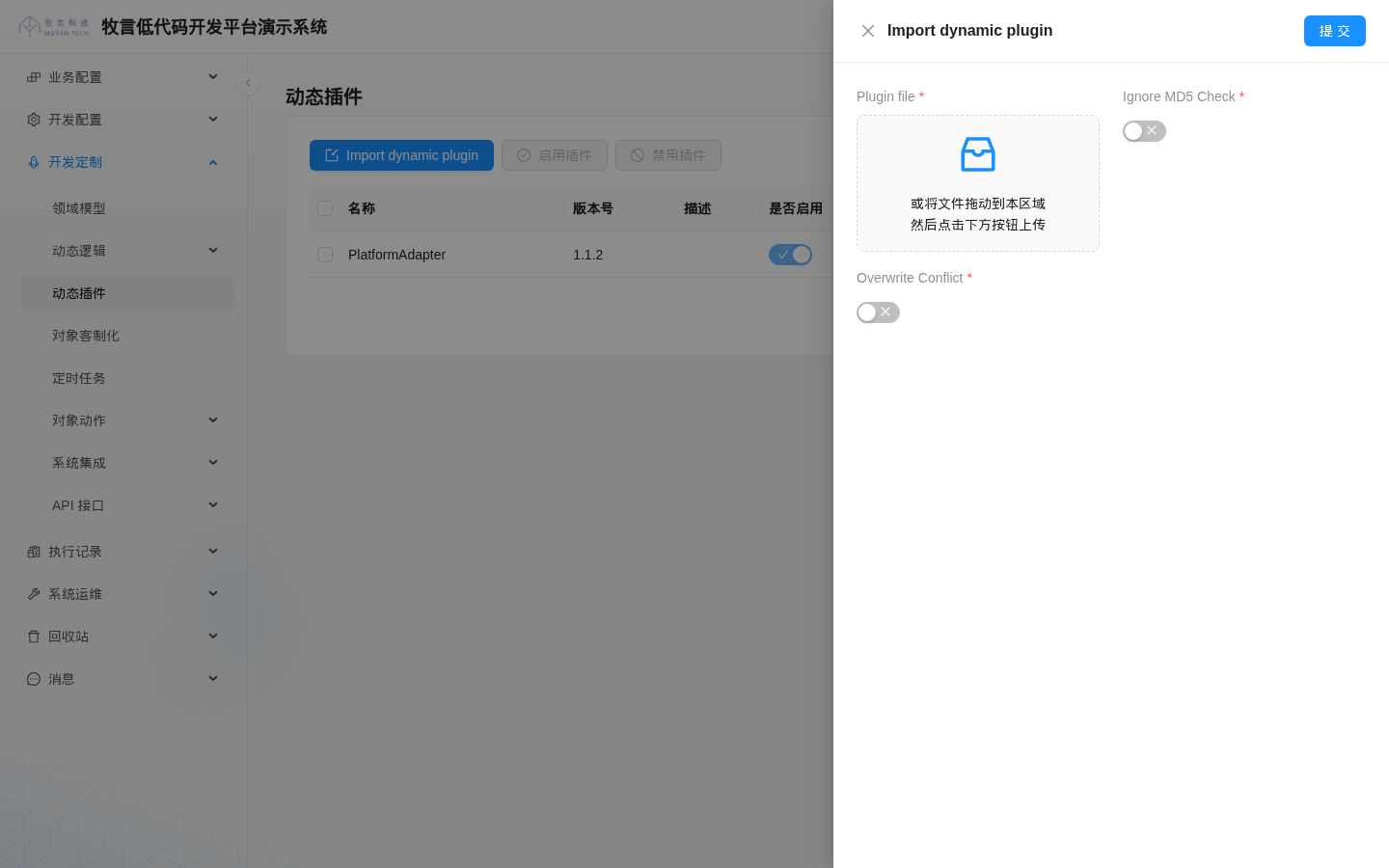
The hint text in the upload area says "Drag file from disk to here and click upload button", but there is no upload button there: just drag the file into the upload area or click the upload area to select a file, then click Submit in the upper-right corner. This is a UI issue in the current version.
| Field | Description |
|---|---|
| Plugin file | The plugin file (.myp) |
| Ignore MD5 Check | Ignore the MD5 check when importing the plugin's seed data: when on, CSV files are re-imported even if they have not changed |
| Overwrite Conflict | When on, forces an overwrite: the plugin is overwritten even if its version is not higher than the existing one, and seed data is imported without conflict detection, so data in the CSV overwrites data changed in the UI. This only applies to CSV files that are actually imported: CSV files whose content has not changed (same MD5) are skipped entirely by default, and are re-imported only if Ignore MD5 Check is also on. When the plugin file name contains SNAPSHOT, this is treated as on regardless of the setting |
# Version and Overwrite Rules
- Only one record is kept per plugin name. Importing a plugin with the same name updates that record; multiple versions do not coexist.
- When the imported version is higher than the existing version, it overwrites the existing plugin and is enabled automatically.
- When the imported version is equal to or lower than the existing version, it is silently ignored by default: there is no message in the UI, only a warning in the backend log. The following two cases are exceptions and force an overwrite:
- The plugin file name contains
SNAPSHOT; Overwrite Conflictis turned on during import.
- The plugin file name contains
- In these two cases, the plugin's seed data is also forcibly overwritten without conflict detection: as long as a CSV file's content has changed (or
Ignore MD5 Checkis turned on during import), data changed in the UI is overwritten by that CSV; CSV files whose content has not changed are still skipped entirely based on MD5. So plugins whose file names containSNAPSHOTare only suitable for development environments.
Therefore, when releasing a new version of a plugin, always increase version in build.gradle.
# Enabling and Disabling
Select plugins in the list and click Enable dynamic plugins or Disable dynamic plugins. After enabling or disabling, the platform reloads the plugins; no restart is needed.
# Plugin Runtime
- All plugins enabled on the platform share the same runtime environment, and plugins can call each other directly.
- Plugins call platform capabilities through the
tech.muyan:apilibrary, see Platform API.
# Developing Plugins
# Target Audience
This document is mainly intended for advanced developers who want to learn how to develop plugins for the Muyan development platform.
# Prerequisites
Readers need some familiarity with Gradle. Reference: Gradle (opens new window).
# Build Environment
- JDK 25: the plugin's Java toolchain is 25, and the JDK that runs Gradle itself must also be 25.
- Gradle 9: the template ships with the Gradle Wrapper (9.2.0); just use
./gradlew.
WARNING
If the Gradle daemon runs on a JDK lower than 25, packaging fails with class file version 69.0 ... up to 65.0. First run ./gradlew --stop to stop the old daemon, make sure JAVA_HOME points to JDK 25, and rebuild. Do not lower the toolchain version.
# Creating a Plugin
- Create a project from the platform template repository
muyantech/platform(a private repository; request access from Muyan). - The plugin project is in the
codes/directory:rootProject.nameincodes/settings.gradleis the plugin name;versionincodes/build.gradleis the plugin version;codes/src/holds the plugin's Java/Groovy source code;codes/data/holds the plugin's seed data (csv/,groovy/and so on), which is packaged into the plugin as a whole; the CSV files indata/plugin-csv/are merged intocsv/in the package, anddata/plugins/stores the built.mypfiles and is not packaged;codes/ui-component/is the plugin's frontend component project (optional).
- Add third-party dependencies through
build.gradleand start writing business logic.
# Build Configuration
The template's codes/build.gradle already contains the following key configuration (an excerpt; the template is authoritative for the full content, for example the project-level repositories, test and coverage configuration are not listed). Usually you only need to change the version, dependencies and dependsOnPlugins:
buildscript {
  repositories {
    mavenCentral()
    maven {
      url = uri('http://packages.muyan.io/artifactory/libs-release')
      allowInsecureProtocol = true
    }
    maven {
      url = uri('http://packages.muyan.io/artifactory/libs-snapshot')
      allowInsecureProtocol = true
    }
  }
  dependencies {
    classpath 'gradle.plugin.com.github.harbby:gradle-serviceloader:1.1.8'
    classpath 'tech.muyan:gradle-plugin:1.0.0-1-2-SNAPSHOT'
  }
}

plugins {
  id 'java-library'
  id 'groovy'
}
apply plugin: 'tech.muyan.gradle.plugin'

version '0.0.1'
group 'tech.muyan.plugin'

dependencies {
  // Provided by the platform runtime; must be compileOnly and must not be packaged into the plugin
  compileOnly localGroovy()
  compileOnly 'tech.muyan:api:0.0.5'

  // The plugin's own runtime dependencies, packaged into the plugin
  implementation 'commons-io:commons-io:2.7'
}

muyanPlatformPlugin {
  compileGroovyScript false
  // PlatformAdapter is a built-in platform plugin; do not remove it
  dependsOnPlugins([
    'PlatformAdapter': '0.0.1',
  ])
}

// Re-stage the data/ directory before packaging so that packaging still works after clean
tasks.register('stageMuyanData', Sync) {
  from(rootProject.file('data')) {
    exclude 'plugin-csv/**'
    exclude 'plugins/**'
  }
  from(rootProject.file('data/plugin-csv')) {
    into 'csv'
  }
  into(layout.buildDirectory.dir('tmp/muyan'))
}

tasks.named('buildDynamicFramePackage') {
  dependsOn(tasks.named('stageMuyanData'))
}

// The packaging plugin writes an empty dependsOnPlugins as JSON "[]", but the platform needs "{}"; replace it after generation
tasks.named('generateMuyanPluginInfo') {
  doLast {
    def pluginInfo = file("${layout.buildDirectory.get().asFile}/tmp/muyan/PLUGIN_INFO")
    pluginInfo.text = pluginInfo.text.replace('"dependsOnPlugins":[]', '"dependsOnPlugins":{}')
  }
}

java {
  toolchain {
    languageVersion.set(JavaLanguageVersion.of(25))
  }
}
2
3
4
5
6
7
8
9
10
11
12
13
14
15
16
17
18
19
20
21
22
23
24
25
26
27
28
29
30
31
32
33
34
35
36
37
38
39
40
41
42
43
44
45
46
47
48
49
50
51
52
53
54
55
56
57
58
59
60
61
62
63
64
65
66
67
68
69
70
71
72
73
The last two blocks are the template's fixes for known issues in the packaging plugin (tech.muyan:gradle-plugin); do not remove them:
stageMuyanData: the packaging plugin copiesdata/tobuild/tmp/muyanduring the configuration phase, and this copy is deleted after runningclean; this task copies it again before packaging and mergesdata/plugin-csv/intocsv/.- The
doLastofgenerateMuyanPluginInfo: whendependsOnPluginsis empty, the packaging plugin writes it as[], but the platform needs{}when reading it.
The following can be configured in muyanPlatformPlugin:
| Setting | Default | Description |
|---|---|---|
dependsOnPlugins | Empty | Dependent plugins and their minimum versions; PlatformAdapter must be kept. The '0.0.1' in the template is a minimum version requirement; the PlatformAdapter currently built into the platform is 1.1.2, which satisfies it |
compileGroovyScript | false | Whether to precompile the Groovy scripts referenced in DynamicLogic*.csv during packaging |
devHost | http://localhost:8080 | Backend address for uploading plugins in development mode, see Development Mode |
ignoreMd5Check | false | Whether to ignore the MD5 check when uploading plugins in development mode |
overwriteConflict | true | Whether to force an overwrite when uploading plugins in development mode |
# Data Binding
In plugin source code you can define data models (POJO classes) and bind them to platform domain classes. Just make sure the POJO class has the same name as the domain class and implements the tech.muyan.api.DynamicDomainEntity interface. The packaging plugin automatically generates ServiceLoader registration files for classes that implement DynamicDomainEntity and MuyanPlatformComponent, so you do not need to write them by hand.
Here is an example. First define the CSV files for DomainClass and DomainClassField:
# DomainClass
shortName(*),extInfo,createRoleRequirement.name,readRoleRequirement.name,updateRoleRequirement.name,deleteRoleRequirement.name

SampleDynamicOrderDomain,,USER,USER,USER,USER
2
3
# DomainClassField
domainClass.shortName(*),name(*),dataType,referenceDomain.shortName,nullable,editable,defaultValue,options,extInfo

SampleDynamicOrderDomain,orderId,STRING,,Y,Y,,,
SampleDynamicOrderDomain,isActive,BOOLEAN,,N,N,,,
SampleDynamicOrderDomain,totalAmount,BIG_DECIMAL,,Y,N,,,
SampleDynamicOrderDomain,quantity,INTEGER,,N,Y,,,
SampleDynamicOrderDomain,productId,LONG,,Y,Y,,"[1,2,3]",
SampleDynamicOrderDomain,discountRate,DOUBLE,,Y,Y,,,
SampleDynamicOrderDomain,orderDate,LOCAL_DATE,,Y,Y,,,
SampleDynamicOrderDomain,deliveryDateTime,ZONED_DATETIME,,Y,Y,,,
SampleDynamicOrderDomain,additionalInfo,JSON_STRING,,Y,Y,,,
SampleDynamicOrderDomain,buyerTask,DOMAIN_OBJECT,SampleTask,Y,Y,,,
SampleDynamicOrderDomain,sellerTasks,DOMAIN_OBJECT_LIST,SampleTask,Y,Y,,,
2
3
4
5
6
7
8
9
10
11
12
13
TIP
The four *RoleRequirement.name columns in the DomainClass CSV specify the role requirements for create, read, update and delete. When they are not configured, nobody can perform the operations; see Object Permission Control.
Next, define the POJO class:
package tech.muyan.plugin

import tech.muyan.api.DynamicDomainEntity

import java.time.LocalDate
import java.time.ZonedDateTime

class SampleDynamicOrderDomain implements DynamicDomainEntity {

  Long id

  String orderId

  Boolean isActive

  BigDecimal totalAmount

  Integer quantity

  Long productId

  Double discountRate

  LocalDate orderDate

  ZonedDateTime deliveryDateTime

  String additionalInfo

  // SampleTask is another POJO class defined elsewhere; it is only an example here and its definition is not shown.
  // If the SampleTask class is not defined, Object can be used instead. The same applies to sellerTasks below.
  SampleTask buyerTask

  List<SampleTask> sellerTasks

}
2
3
4
5
6
7
8
9
10
11
12
13
14
15
16
17
18
19
20
21
22
23
24
25
26
27
28
29
30
31
32
33
34
35
36
# Using Data Model Binding
With the SimpleQuery utility class described in Platform API, you can operate on data through data model binding. For example
SampleDynamicOrderDomain domain = SimpleQuery
   .of(SampleDynamicOrderDomain.class)
   .eq("orderId", "123456")
   .get()
2
3
4
Or convert the queried data to a POJO object:
SampleDynamicOrderDomain domain = SimpleQuery
   .of("SampleDynamicOrderDomain")
   .eq("orderId", "123456")
   .get() as SampleDynamicOrderDomain
2
3
4
# Lifecycle Callbacks
Classes in a plugin that implement the tech.muyan.api.MuyanPlatformComponent interface receive callbacks after the plugin is loaded:
import tech.muyan.api.MuyanPlatformComponent;

public class CrmStartup implements MuyanPlatformComponent {

  @Override
  public void onLoad() {
    // Runs after the plugin finishes loading, for example to warm up caches or check required configuration
  }

  @Override
  public void offLoad() {
    // Runs when the plugin is unloaded (before reloading), for example to release thread pools and connections
  }
}
2
3
4
5
6
7
8
9
10
11
12
13
14
- After the platform finishes starting, it calls
onLoad()for each tenant in turn; afterwards, whenever a plugin is reloaded because plugins are imported, enabled or disabled, or a jar is replaced in development mode,onLoad()is called again (in a multi-instance deployment, once on each instance), so the logic here must be safe to run repeatedly. - Before reloading,
offLoad()is called on the old plugin instance first; the first load at platform startup does not calloffLoad(). - Both methods have default empty implementations; override only the one you need.
- Catch exceptions yourself inside
onLoad()/offLoad()and do not let them propagate. The platform does not guard the callbacks against exceptions. When an exception is thrown:offLoad()throws: loading the new plugin code fails and the old code keeps running; theoffLoad()of the components not yet executed in all of that tenant's plugins is also skipped. The import still reports success, and onlyFailed to replace classloaderis recorded in the backend log.onLoad()throws: the new code has been loaded, but theonLoad()of the components not yet executed in all of that tenant's plugins is skipped.- In both cases, the finishing steps after reloading are not executed, which affects all tenants on that backend instance: all endpoints of plugin custom Controllers return 404 (the routes were cleared before reloading and not rebuilt), related caches are not refreshed, and all scheduled tasks are paused (CRON tasks no longer fire). In a multi-instance deployment, the other instances do not receive the "loading complete" notification, and are likewise left with endpoints returning 404 and scheduled tasks paused, while still running the old code. The import still reports success.
- Things recover only after the next successful reload (usually after fixing or disabling the faulty plugin first). When
offLoad()fails, restarting the backend recovers it (offLoad()is not called at startup); ifonLoad()throws every time, restarting the backend may not recover it either, becauseonLoad()is also called at startup.
- The "Run at Startup" scheduled task type, removed in 1.0, can have its logic migrated into
onLoad().
# Plugin Frontend Modules
A plugin can carry its own frontend components (React), which the platform frontend loads dynamically through Module Federation.
Write the components in
codes/ui-component/. The component project'smanifest.tsdefault-exports aFrontendPluginManifest, registering custom form renderers informsand field components infields:import { FrontendPluginManifest } from '@muyantech/frontend-lib'; import TestFormRender from './TestFormRender'; export const manifest: FrontendPluginManifest = { fields: {}, forms: { 'TEST_FORM': { Render: TestFormRender, } } } export default manifest;1
2
3
4
5
6
7
8
9
10
11
12
13Configure the build command and output directory in
codes/ui-component/build.json(when omitted, the defaults areyarn && yarn buildandbuild):{ "buildCommand": "yarn && yarn build", "targetFolder": "dist" }1
2
3
4Register the module in
codes/data/csv/DisplayComponentModule.csv, withpackageFileset to the frontend project's directory relative tocodes/:name(*),packageFile Test Module,ui-component1
2
3
When the plugin is packaged, the build command runs in that directory, and the output directory is zipped into the plugin. After the plugin is imported, the platform tells the frontend which modules to load through modules[].entry (/theme/module/<hash>/mf-manifest.json) returned by GET /theme/info.
WARNING
/theme/info returns modules only when an active display theme exists. This section is based on the packaging plugin and the platform source code; the sample module in the template is commented out by default.
# WebSocket
A plugin can handle messages sent by the frontend over WebSocket and push messages to the frontend. Extend tech.muyan.api.websocket.MuyanWebSocketComponent:
import tech.muyan.api.websocket.MuyanWebSocketComponent

class EquipmentStatusSocket extends MuyanWebSocketComponent {

  @Override
  String getTopic() {
    return 'equipmentStatus'
  }

  @Override
  Object onMessage(String sessionId, String msgId, Object payload) {
    // The return value is sent back to the sender as the reply to this message
    return [received: true]
  }

  @Override
  void onClose(String sessionId) {
    // Cleanup when the connection closes
  }
}
2
3
4
5
6
7
8
9
10
11
12
13
14
15
16
17
18
19
20
getTopic(): the message topic this component handles.onMessage(sessionId, msgId, payload): called when a message on this topic is received; the return value is sent to the sender as the reply (with the samemsgId).pushMessage(sessionId, msgId, payload): actively sends a message to a connection.broadcast(payload): sends a message to all connections subscribed to this topic.onClose(sessionId): called when a connection closes; optional.
The client connection address is ws://<server address>/api/websocket/route?access_token=<access_token>. Messages are sent as JSON: {"msgId": "...", "type": "...", "topic": "equipmentStatus", "payload": {...}}, and are handled by the component for topic. To subscribe / unsubscribe (you only receive broadcast after subscribing), set type to subscribe / unsubscribe and put the topic list in payload.topics, for example {"msgId":"1","type":"subscribe","payload":{"topics":["equipmentStatus"]}}. Sending plain text ping returns pong.
api version
The platform runtime's onMessage returns Object, while the return type declared in api 0.0.5 is void. WebSocket components compiled against 0.0.5 do not work properly on the current platform; use the 1.0.0 series api library (see Platform API).
# Custom Controller
A plugin can register its own HTTP endpoints. Implement tech.muyan.api.MuyanDynamicController, specify the path prefix with @Mapping on the class, declare routes with @Get, @Post, @Put and @Delete on methods, and bind parameters with @UrlParameter (a {variable} in the path) or @QueryParameter (a URL parameter):
import tech.muyan.api.MuyanDynamicController
import tech.muyan.api.annotations.Get
import tech.muyan.api.annotations.Mapping
import tech.muyan.api.annotations.QueryParameter
import tech.muyan.api.annotations.UrlParameter

@Mapping('/equipment')
class EquipmentController implements MuyanDynamicController {

  @Get(value = '/{code}/status', roleRequirement = 'USER')
  Map status(@UrlParameter('code') String code, @QueryParameter('detail') String detail) {
    return [code: code, status: 'RUNNING', detail: detail == 'true']
  }
}
2
3
4
5
6
7
8
9
10
11
12
13
14
The example above registers the endpoint GET /api/equipment/<code>/status?detail=true. All requests not matched by the platform's built-in routes are handed to the routes registered by plugins. The return value is converted to JSON.
Parameter values are converted from strings to the parameter types; it is recommended to declare parameters as String and parse them yourself. For example, when declared as Boolean, ?detail=false is also converted to true.
Security note
roleRequirementtakes the name of a role requirement. If it is omitted, or set to a name that does not exist, the endpoint can be accessed without login. Explicitly set an existing role requirement for every endpoint.- These annotations and interfaces are only provided in the 1.0.0 series of the api library; they are not in api 0.0.5.
- Do not end the value of
@Mappingwith/(for example/equipment/), otherwise the registered paths will be incorrect.
# Dynamic RPC
Plugins, or different platform instances, can call each other through dynamic RPC (based on gRPC):
- Server side: in a plugin, implement an interface that extends
tech.muyan.api.MuyanRpcServiceand provide an implementation class. - Client side: add the
@RpcClient(host, port, tenant, password, caCertPath, serverName)annotation to the interface, then get a proxy object throughDynamicRpcClientService.getClientProxy(Interface.class)and call it.
The server side is configured through the following environment variables:
| Environment variable | Description |
|---|---|
DYNAMIC_RPC_SERVER_PORT | Listening port, default 7777 |
DYNAMIC_RPC_SERVER_CERT_PATH | TLS certificate path; TLS is enabled only when configured together with the next item |
DYNAMIC_RPC_SERVER_KEY_PATH | TLS private key path |
DYNAMIC_RPC_PASSWORD | Call password; the password of the client's @RpcClient must match it |
Security note
The platform always starts the RPC service on port 7777 (or DYNAMIC_RPC_SERVER_PORT) at startup. When DYNAMIC_RPC_PASSWORD is empty, no authentication is performed, and without a certificate the communication is not encrypted. Anyone who can reach this port can call the services in plugins that implement MuyanRpcService. In production, be sure to:
- Set
DYNAMIC_RPC_PASSWORD; - Configure a TLS certificate;
- Not expose the port to the public internet; restrict access sources with a firewall or container network.
In addition, the default value of password in @RpcClient is password; set it explicitly on the client side.
# Packaging a Plugin
When development is done, run in the codes/ directory:
./gradlew buildMuyanPlugin
The output is codes/build/muyan/<plugin name>-<version>.myp. Packaging runs the following in order:
generateMuyanPluginInfo: generates the plugin descriptor filePLUGIN_INFO(name, version, dependent plugins);compileSeedDataGroovy: copies the plugin jar and runtime dependencies tolibs/in the package;buildDynamicFramePackage: formerly used to build the frontend projects referenced by theframeFilecolumn inDynamicForm*.csv. Since 1.0 the platform has removed theframeFilecolumn, so this step no longer produces anything, but the task is kept (the template hooksstageMuyanDatain before it);buildFrontendPackage: builds the frontend modules;- packages the seed data under
codes/data/together.
implementation dependencies are packaged into libs/ of the plugin package; compileOnly dependencies (including tech.muyan:api) are not.
# Importing Plugins over HTTP in Development Mode
During development you can push plugins straight to the local backend without going through the UI:
./gradlew buildAndUploadMuyanPlugin   # Package and import the whole plugin
./gradlew hotReloadSourceJar          # Replace only the plugin's jar and reload the plugin
2
The target address is configured by devHost in muyanPlatformPlugin (default http://localhost:8080). The backend opens these endpoints only when the environment variable PLATFORM_DEV_MODE=true is set; otherwise they return 401 OperationInvalid.
Security note
The development-mode upload, import and jar replacement endpoints (/dev/upload/part, /dev/plugin/import, /dev/plugin/jar/replace) do not require login. With PLATFORM_DEV_MODE on, anyone who can reach the backend can upload and run arbitrary code. Only turn it on in a local development environment; never set PLATFORM_DEV_MODE in production.